WALoops Notifications For Telegram Wordpress Plugin - Rating, Reviews, Demo & Download
Plugin Description
Get a Telegram message the moment something happens on your site:
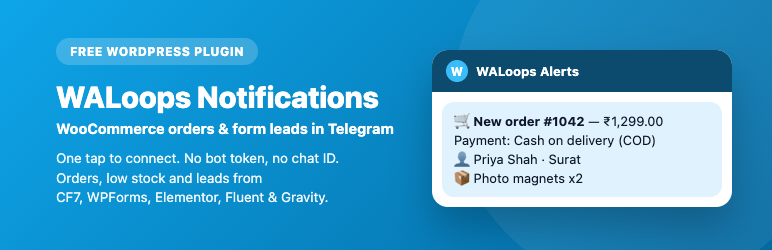
- New WooCommerce orders with the order number, total, payment method (COD is marked), customer, city, products and coupon, plus a link to open the order.
- Order status changes you choose, such as cancelled, refunded or failed.
- Low stock and out of stock products.
- Form leads from Contact Form 7, WPForms, Elementor Pro Forms, Fluent Forms and Gravity Forms.
One tap, no bot token
Most Telegram plugins make you create a bot in BotFather, copy its token and hunt for a chat ID. With the default WALoops bot mode you connect your site with your email, tap Connect Telegram, press Start in Telegram, and you are done. To alert your team, tap Add to a group instead. Link as many chats and groups as you like.
Or use your own bot
Prefer your own bot? Switch to My own bot, paste the token from @BotFather, send /start to it and tap Find my chat. Messages then go straight from your site to Telegram, with no WALoops account.
Never slows down checkout
Alerts are sent in the background (Action Scheduler when WooCommerce is active, WP-Cron otherwise), so checkout and form submits never wait for Telegram. Each order is sent once, even when its status changes again, and old orders that get updated are skipped.
Privacy
Turn off Include customer details to leave names, cities, emails and phone numbers out of every alert.
External services
This plugin connects to the services below. Nothing is sent until you connect the plugin in its settings.
WALoops (app.waloops.com) — used in the default “WALoops bot” mode.
* When you click Connect with email, the plugin sends your email address and this site’s URL to create or find your WALoops account.
* To show and manage your linked Telegram chats, the plugin calls the WALoops API with your site’s key.
* For each enabled event, the plugin sends the event’s details to WALoops, which delivers the alert to your linked Telegram chats through the WALoops Alerts bot. For orders: order number, total, payment method, customer name and city (unless “Include customer details” is off), product names, coupon codes and the order’s admin link. For status changes: order number, old and new status, total and customer name. For low stock: product name, SKU and stock level. For forms: the form name, the labels and values entered (except password, captcha, hidden and file fields; emails and phone numbers are left out when “Include customer details” is off) and the page address.
* WALoops terms: https://waloops.com/terms — privacy policy: https://waloops.com/privacy-policy
Telegram Bot API (api.telegram.org) — used in “My own bot” mode. The plugin sends your bot token and the alert text (the same details as above) straight to Telegram, and reads your bot’s recent updates when you click Find my chat. In WALoops bot mode, WALoops sends the messages to Telegram for you.
* Telegram terms: https://telegram.org/tos — privacy policy: https://telegram.org/privacy
Trademarks
Telegram is a trademark of its owner. This plugin is made by WALoops and is not affiliated with, endorsed by or sponsored by Telegram.
Screenshots

Connect Telegram in one tap.

A new order alert in Telegram.

Choose what to send.