
Softglaze AI Crawler Monitor Wordpress Plugin - Rating, Reviews, Demo & Download
Plugin Description
Softglaze AI Crawler Monitor records every request from a known AI crawler that reaches WordPress. It shows you which crawlers came, what they asked for, and what your site told them at the time.
Most plugins in this area stop at writing a rule. This one is built around the gap between writing a rule and the rule working, because on the open web those are not the same thing.
You can find out:
- Which AI crawlers requested pages on your site, how often, and which pages.
- What each crawler was told, and whether it took any notice.
- Which requests were refused, if you chose to refuse them.
What it can and cannot do
There are three ways to tell a crawler to stay away. Only one of them is enforced, and the plugin repeats that on every screen where you make the choice.
- A robots.txt rule. This is a request, not a barrier. Well behaved crawlers honour it. One that ignores it can still fetch your pages, and nothing on your server stops it.
- An
X-Robots-Tag: noai, noimageaiheader, sent only on requests from that crawler. Also a request, and a weaker one, becausenoaiis not an agreed standard and most crawlers ignore it. - Refusing the request with a 403. This is the only setting that is actually enforced. A matching request gets an empty “403 Forbidden” and the page is never sent.
The header never contains noindex, nofollow or none under any setting. Those would take your pages out of ordinary Google and Bing results, which is not what anyone means when they say they want to block AI.
Three crawlers in the list are documented by their own operators as fetching pages when a person asks a question, with robots.txt rules that may not apply to them: ChatGPT-User, Perplexity-User and Meta-ExternalFetcher. All three are marked on the crawler screen, right next to the setting, so you find out before you rely on it rather than afterwards.
Your robots.txt is always served, even to a crawler you are refusing. Blocking a crawler from reading robots.txt would leave it no way to learn that you want it to stay away.
Per-content control
The site-wide setting is the default. Any single post, page or product can override it from the edit screen, from quick edit, or from bulk edit. A column in the posts list shows which content has its own setting, and you can filter by it.
A per-post setting sends the X-Robots-Tag header and does nothing else. It adds no lines to robots.txt, it cannot refuse a request, and it cannot lift a refusal you set site-wide. The edit screen says so in those words.
What it cannot see
The plugin records requests that reach WordPress. Plenty of requests never get that far, and rather than quietly under-report, it tells you so:
- Requests your CDN or firewall answers before they reach your server.
- Requests served from a page cache. On a test server with page caching on, only one request in five reached WordPress at all.
- Static files. Images, stylesheets, scripts and fonts are served without running WordPress.
- Addresses on your domain that WordPress does not handle.
- Any crawler that is not in this plugin’s list.
There is a banner above every figure in the plugin saying this. You cannot dismiss it, because it changes what the numbers mean.
Crawler identity checking
A user agent is self declared, so anything can claim to be GPTBot. The plugin can check whether a crawler really is what it says.
Both checks are switched off until you turn them on, because both mean contacting a server outside your site. Left off, the plugin still does everything else, and crawlers are recorded as “not checked”, which is what they honestly are.
A crawler is only ever recorded as having failed a check when a check actually ran and gave a negative answer. A check that could not run is never treated as a failure.
Checking only works where the operator publishes something to check against. Eleven of the crawlers in the list can be checked. The rest stay “not checked” however you set these options, because their operators publish nothing to check them with, and the crawler screen tells you which is which.
Crawlers included in this version
GPTBot, OAI-SearchBot, ChatGPT-User, ClaudeBot, Claude-User, Claude-SearchBot, Google-Extended, PerplexityBot, Perplexity-User, meta-externalagent, Meta-WebIndexer, Meta-ExternalFetcher, Applebot, Applebot-Extended, Bytespider, CCBot, Amazonbot, Amzn-SearchBot, Amzn-User, cohere-ai, Diffbot, Diffbot-User, Timpibot, YouBot.
Every one of these was checked against the operator’s own published documentation, and each entry records the page it came from. The crawler screen links to that page for each one.
Three of them have no published documentation at all: Bytespider, cohere-ai and Timpibot. They are in the list because the requests are real and you are entitled to see them, and each is labelled on screen as undocumented, since nobody has stated whether they read robots.txt.
Crawler names and robots.txt tokens change over time. The list ships with the plugin, it is versioned, and it is never fetched from a remote server.
Other plugins by SoftGlaze
- SoftGlaze PDF Invoices for WooCommerce — invoices, packing slips, proformas and credit notes from your WooCommerce orders, rendered locally.
- SoftGlaze Maintenance Mode & Coming Soon — coming soon and maintenance pages with templates, countdowns and access control.
- SoftGlaze Click to Chat — a WhatsApp chat button with multiple agents, schedules and WooCommerce support.
External services
On a default install this plugin contacts nothing at all.
It has two features that make an outbound request. Both are switched off when the plugin is installed, and neither one does anything until you tick its box on the settings screen. Neither runs while a page is being served; both run only on a scheduled task in the background.
There is no analytics, no telemetry, no licence check and no update check. Nothing is ever sent to Softglaze or to the plugin’s author, under any setting.
1. Reverse address lookups (DNS) — off by default
What it is and what it is for: a reverse DNS lookup, used to confirm that a crawler’s address really belongs to the company its user agent claims. A user agent is self declared, so anything can claim to be a given crawler; this is how that claim is tested.
Where it goes: this does not contact a service the plugin chooses. It asks the domain name resolver your server is already configured to use, which will be your host’s or your network’s. Because the plugin does not select the provider, there is no third party service here with terms or a privacy policy for us to link to. Which resolver your server uses, and that operator’s terms, are a matter between you and your host.
What data is sent, and when: the crawler’s IP address, and nothing else. This is the only feature in the plugin that sends any visitor information anywhere. It is sent on a scheduled task that runs at most every fifteen minutes, and only for addresses belonging to crawler requests already recorded on your site. The address of an ordinary human visitor is never looked up, because an ordinary visitor is never recorded in the first place.
Under which conditions: only when you have switched “Check crawler identity by reverse address lookup” on. With it off, crawlers are recorded as “not checked” and no address goes anywhere.
Which crawlers this affects: one, YouBot, because you.com is the only operator in the current list that publishes a hostname pattern to check an address against. For every other crawler in the list this setting does nothing at all.
2. Published address lists (HTTPS) — off by default
What it is and what it is for: some AI companies publish, on their own website, the list of IP addresses their crawlers use. When you switch this on, the plugin downloads those files and checks recorded crawler addresses against them. This is the second, independent way of testing a self declared user agent.
What data is sent, and when: nothing about your site, nothing about you, and nothing about any visitor. It is an ordinary unauthenticated GET request for a public file — the same request your own browser would make if you typed the address into it. No identifier, no site URL and no query string is attached. Each file is downloaded at most once per operator per day and the result is stored on your server.
Under which conditions: only when you have switched “Check crawler identity against published address lists” on.
These, in full, are the only addresses this setting ever requests. There are no others, and the plugin never contacts an address that is not in this list.
OpenAI, for GPTBot, OAI-SearchBot and ChatGPT-User.
Files requested: https://openai.com/gptbot.json , https://openai.com/searchbot.json , https://openai.com/chatgpt-user.json
Terms of use: https://openai.com/policies/terms-of-use/
Privacy policy: https://openai.com/policies/privacy-policy/
Anthropic, for ClaudeBot, Claude-User and Claude-SearchBot.
File requested: https://claude.com/crawling/bots.json
Terms of use: https://www.anthropic.com/legal/consumer-terms
Privacy policy: https://www.anthropic.com/legal/privacy
Apple, for Applebot.
File requested: https://search.developer.apple.com/applebot.json
Terms of use: https://www.apple.com/legal/internet-services/
Privacy policy: https://www.apple.com/legal/privacy/
Perplexity, for PerplexityBot and Perplexity-User.
Files requested: https://www.perplexity.ai/perplexitybot.json , https://www.perplexity.ai/perplexity-user.json
Terms of use: https://www.perplexity.ai/hub/legal/terms-of-service
Privacy policy: https://www.perplexity.ai/hub/legal/privacy-notice
Common Crawl, for CCBot.
File requested: https://index.commoncrawl.org/ccbot.json
Terms of use: https://commoncrawl.org/terms-of-use
Privacy policy: https://commoncrawl.org/privacy-policy
Documentation links, which are not requests
Separately from the two features above, the Crawler access screen shows a “documentation” link beside each crawler, pointing at the page on the operator’s own website where that crawler’s behaviour is documented. These are ordinary links in the page. The plugin never fetches them, on any setting, and nothing is requested unless you choose to click one and open it in your own browser.
They are listed here so that the presence of these addresses in the plugin’s source is not mistaken for an undisclosed service. The pages linked are Amazon’s Amazonbot page, Anthropic’s crawler support article, Apple’s Applebot page, Common Crawl’s CCBot page, Diffbot’s robots.txt FAQ, Google’s crawlers page, Meta’s web crawlers page, OpenAI’s bots page, Perplexity’s bots page and you.com’s YouBot page. Three crawlers — Bytespider, cohere-ai and Timpibot — have no documentation link, because their operators publish none.
Every address in this section is also recorded in the plugin folder at includes/data/bot-registry.php, where each crawler carries the documentation page it was checked against and the address list published for it, if there is one. The registry ships with the plugin and is never fetched from a remote server.
Privacy
Visitor IP addresses are never stored in the request log. Each record holds a one way hash instead, made with a random value that is generated when the plugin is installed on your site and is never shared. The hash cannot be turned back into an address.
The raw user agent is not stored either. It is matched against the crawler list, recorded as a crawler name, and then discarded.
There is one exception, and it only exists if you switch on reverse address lookups:
- A crawler’s full address is held in a separate table for as long as the lookup takes, then deleted straight away.
- Anything left over is removed after 60 minutes whether it was checked or not, including on sites where scheduled tasks are not running.
- Deactivating the plugin empties that table immediately.
- It never appears on any screen or in any export.
With reverse address lookups off, which is the default, that table is never written to at all.
How long things are kept is not the same for everything, and the settings screen spells this out:
- Individual request records: 90 days by default, adjustable between 7 and 365.
- Daily totals per crawler: kept indefinitely. Counts only, with no visitor information.
- Daily list of most requested addresses: 400 days. Counts and addresses only.
- Identity check results: 7 days.
- The short lived lookup queue described above: 60 minutes at most.
There is no analytics and no telemetry. Nothing about your site or your visitors is ever sent to the plugin’s author.
Screenshots
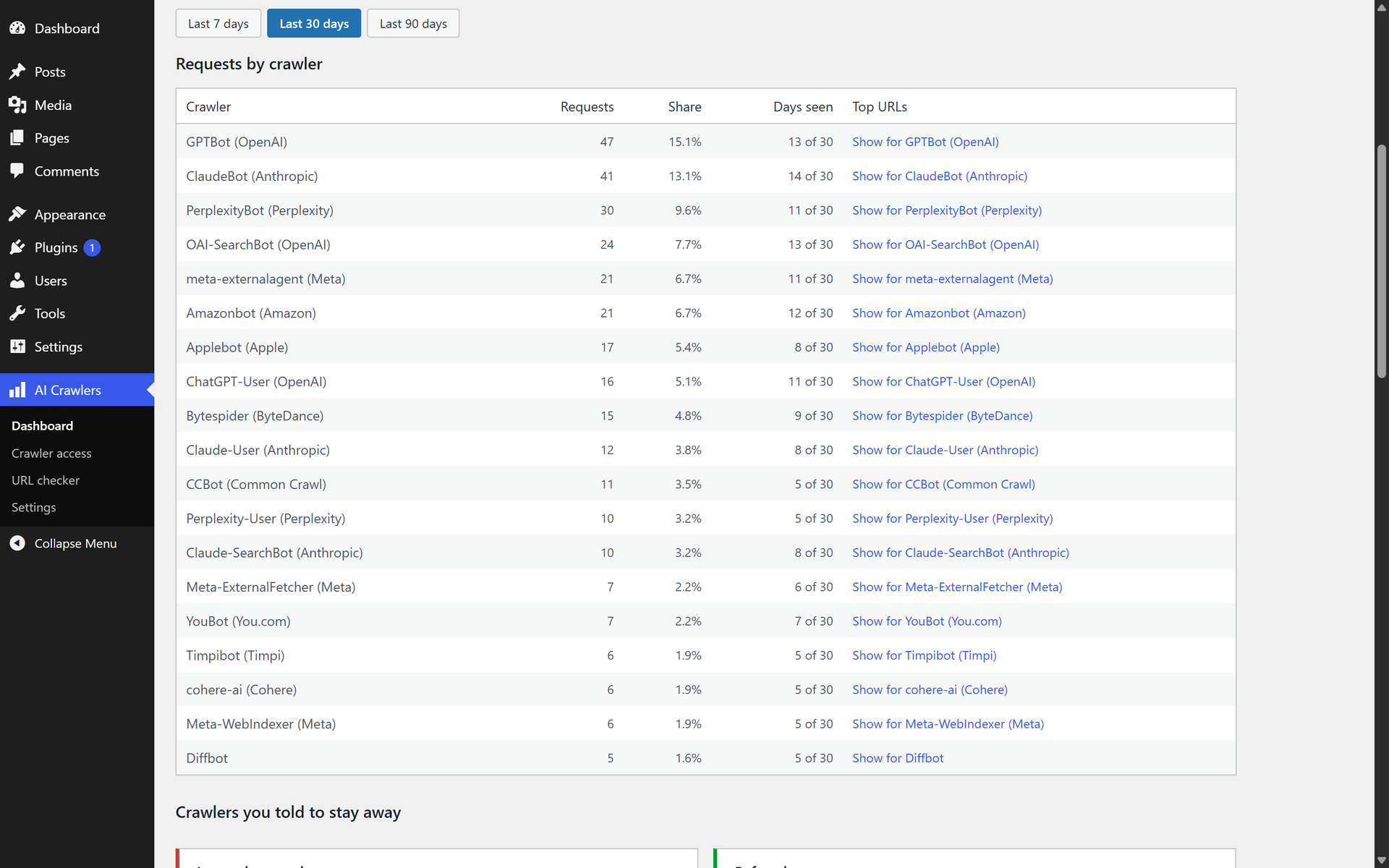
The dashboard. Every known AI crawler that reached WordPress, how many requests each made, its share of the total, and how many days it was seen.
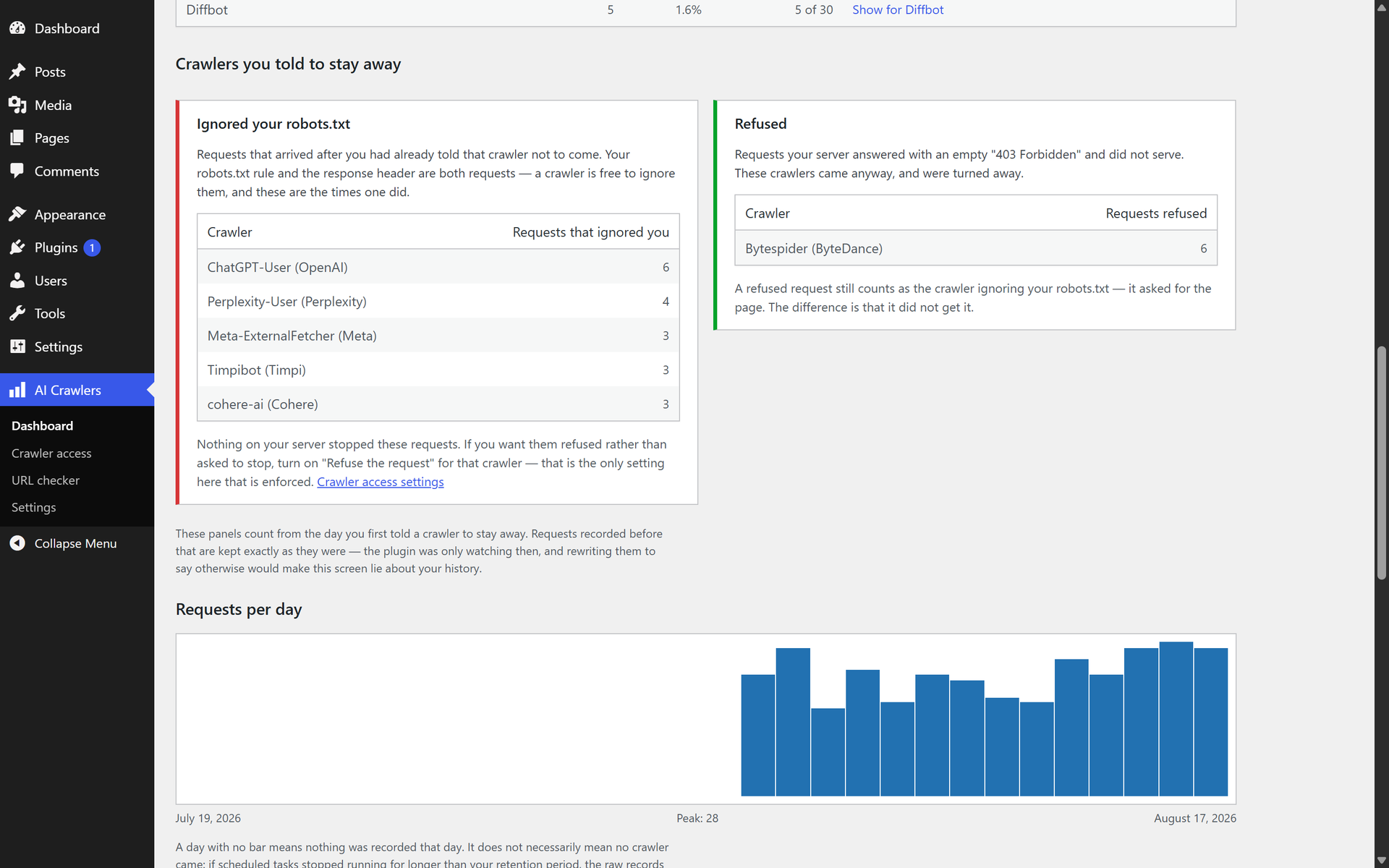
Crawlers you told to stay away. The left panel counts requests that arrived after you had already disallowed that crawler; the right panel counts requests your server refused with a 403. Both count only from the day you set the rule.
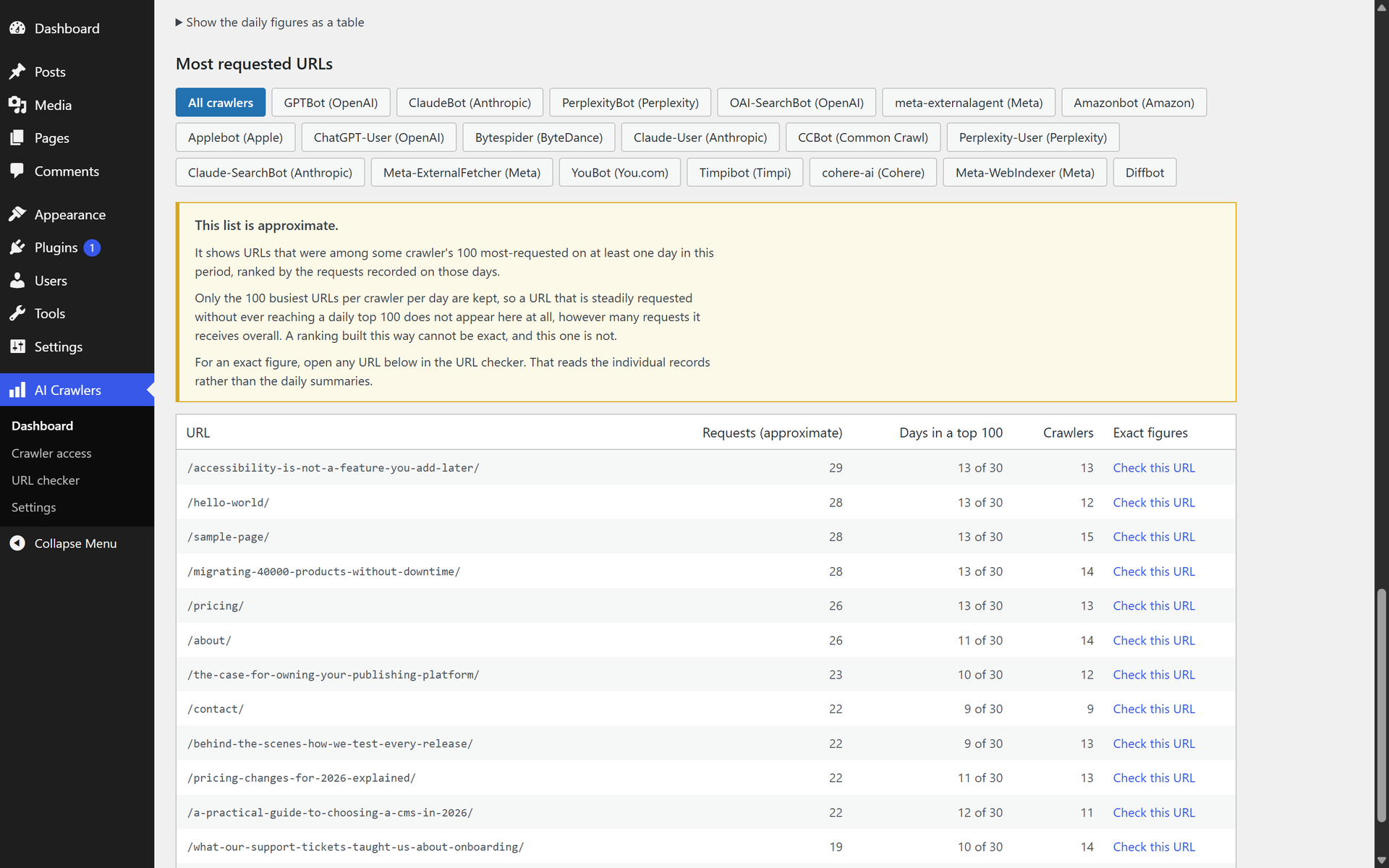
Most requested URLs, filterable by crawler. The notice explains why this ranking is approximate and points at the URL checker for exact figures.
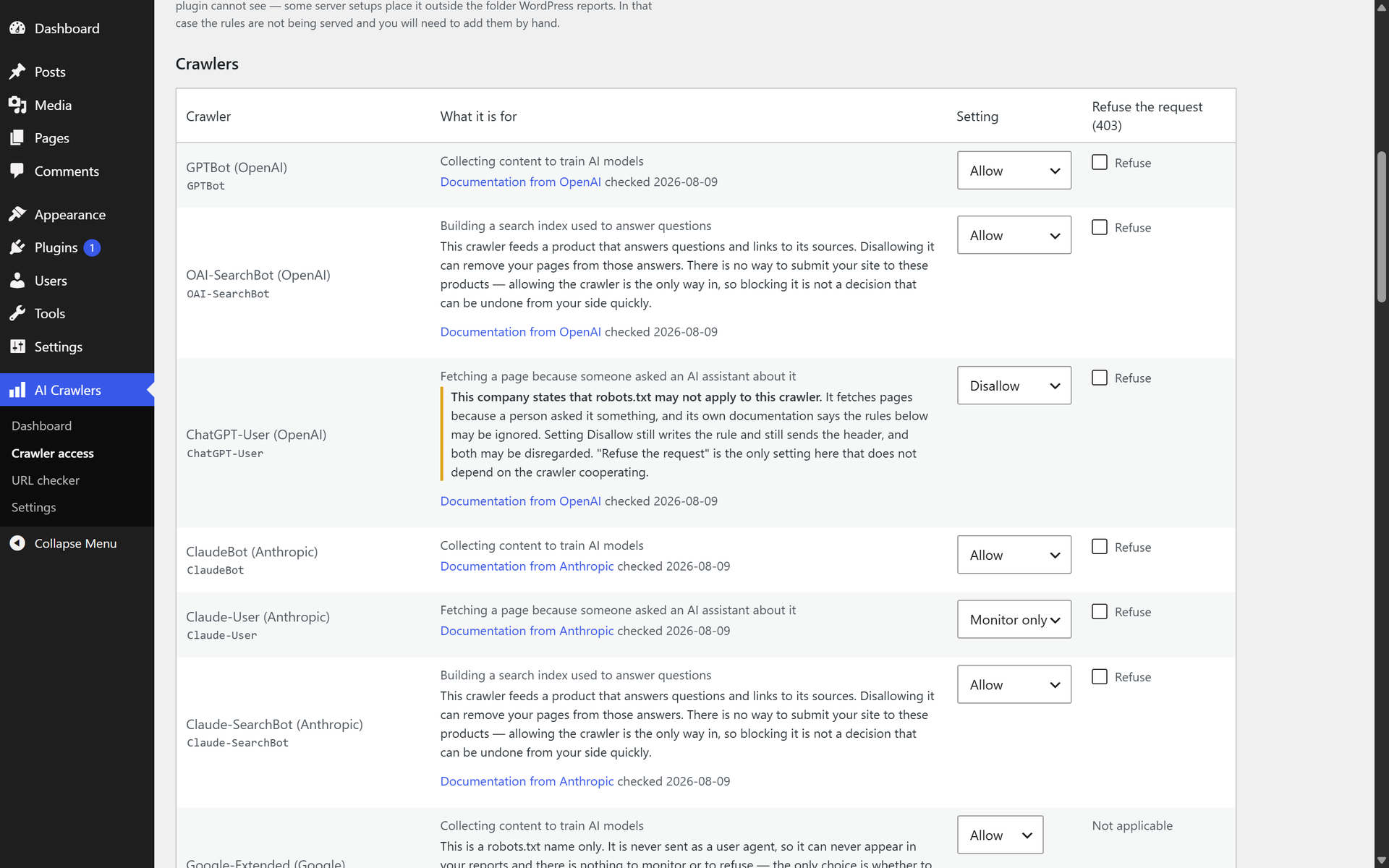
Crawler access. One setting per crawler, each with the operator’s own documentation linked and the date it was checked. ChatGPT-User carries a warning because OpenAI documents that robots.txt may not apply to it.
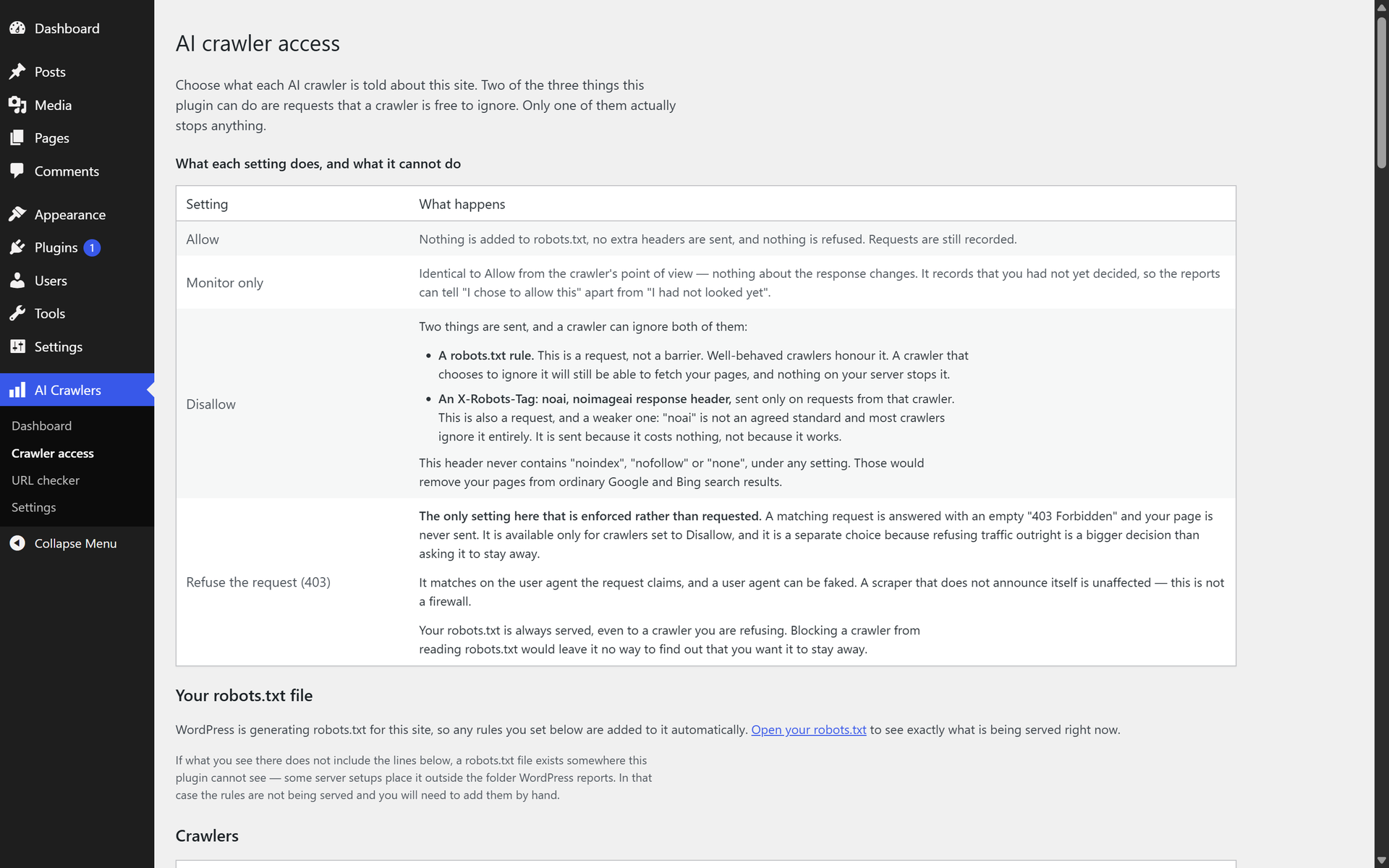
What each setting actually does, and what it cannot do. Only “Refuse the request” is enforced; the other two are requests a crawler is free to ignore.
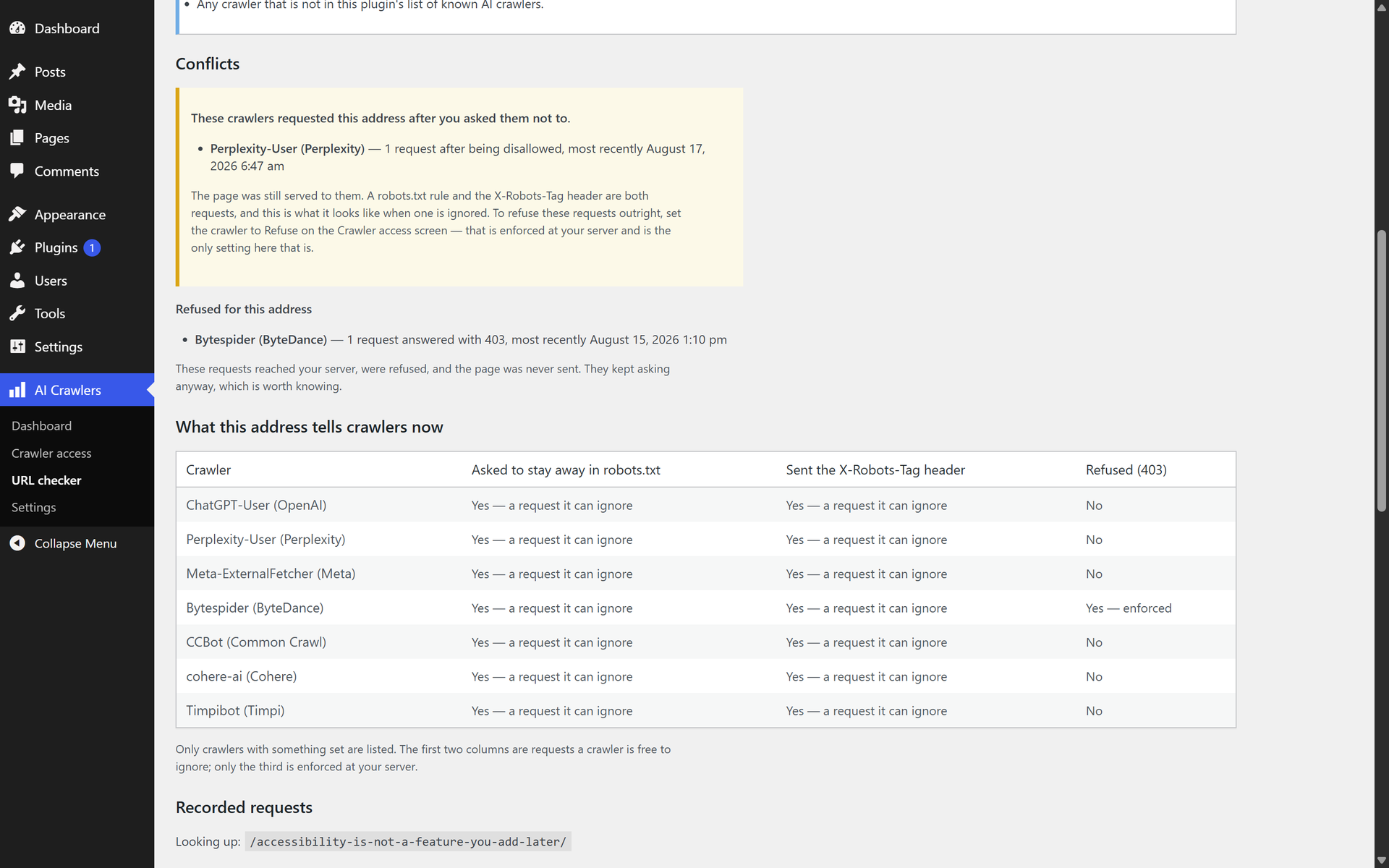
The URL checker. Exact per-address figures counted from individual records, the crawlers that requested the address after being asked not to, and what that address currently tells each crawler.
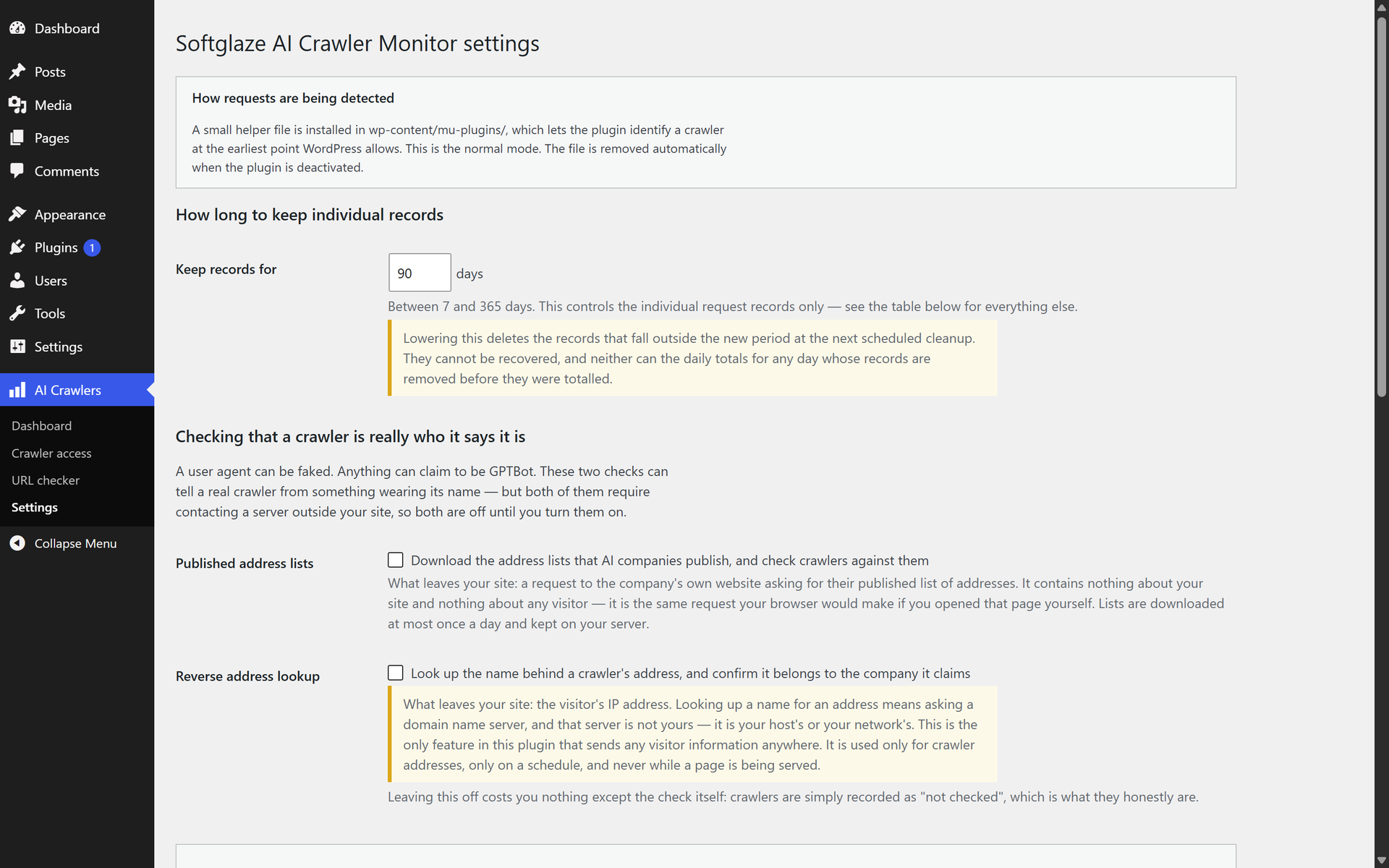
Settings. Retention is 90 days by default. Both identity checks contact a server outside your site, so both are off until you switch them on.
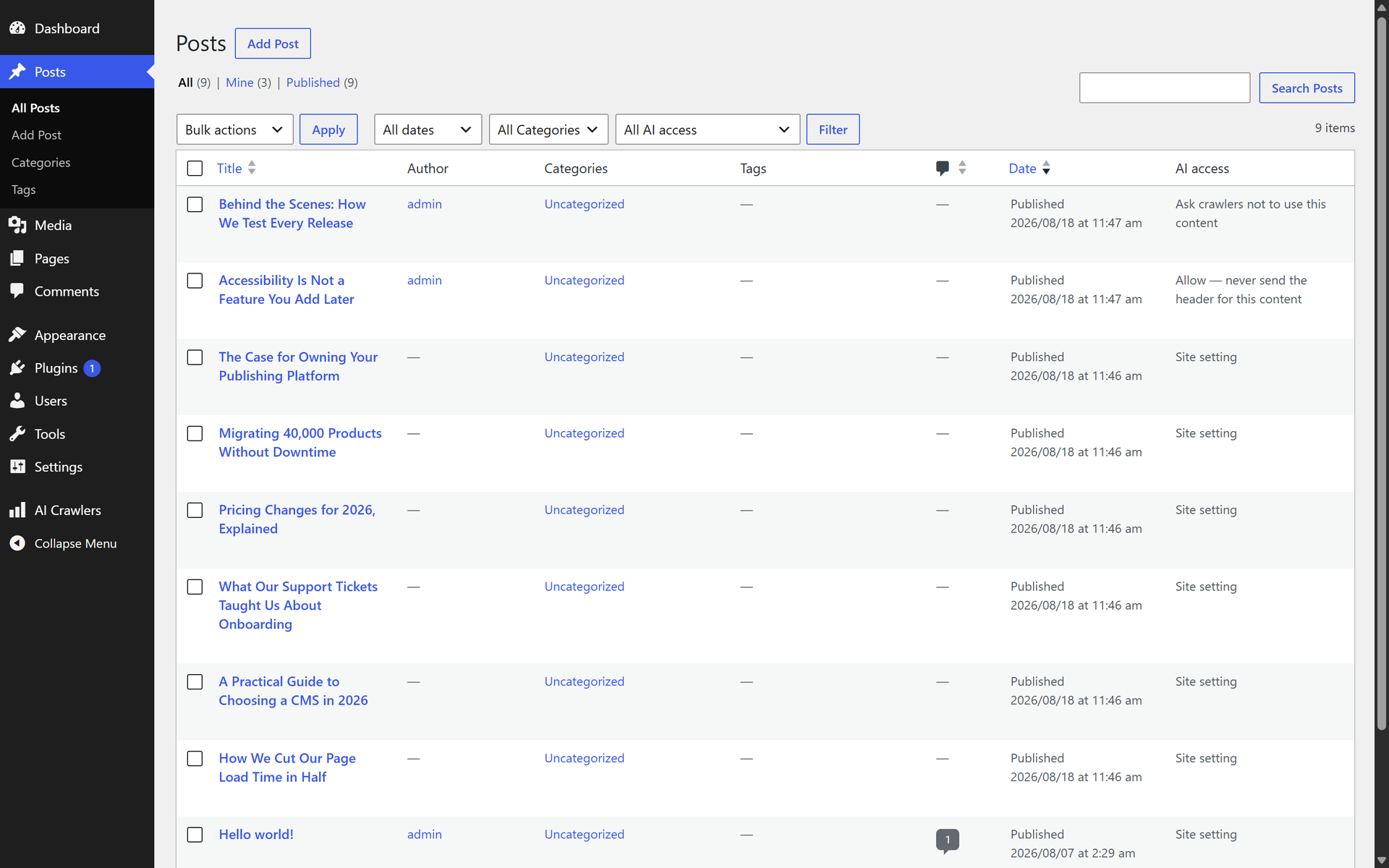
The posts list gains an “AI access” column and a filter, so you can see which content has its own setting.
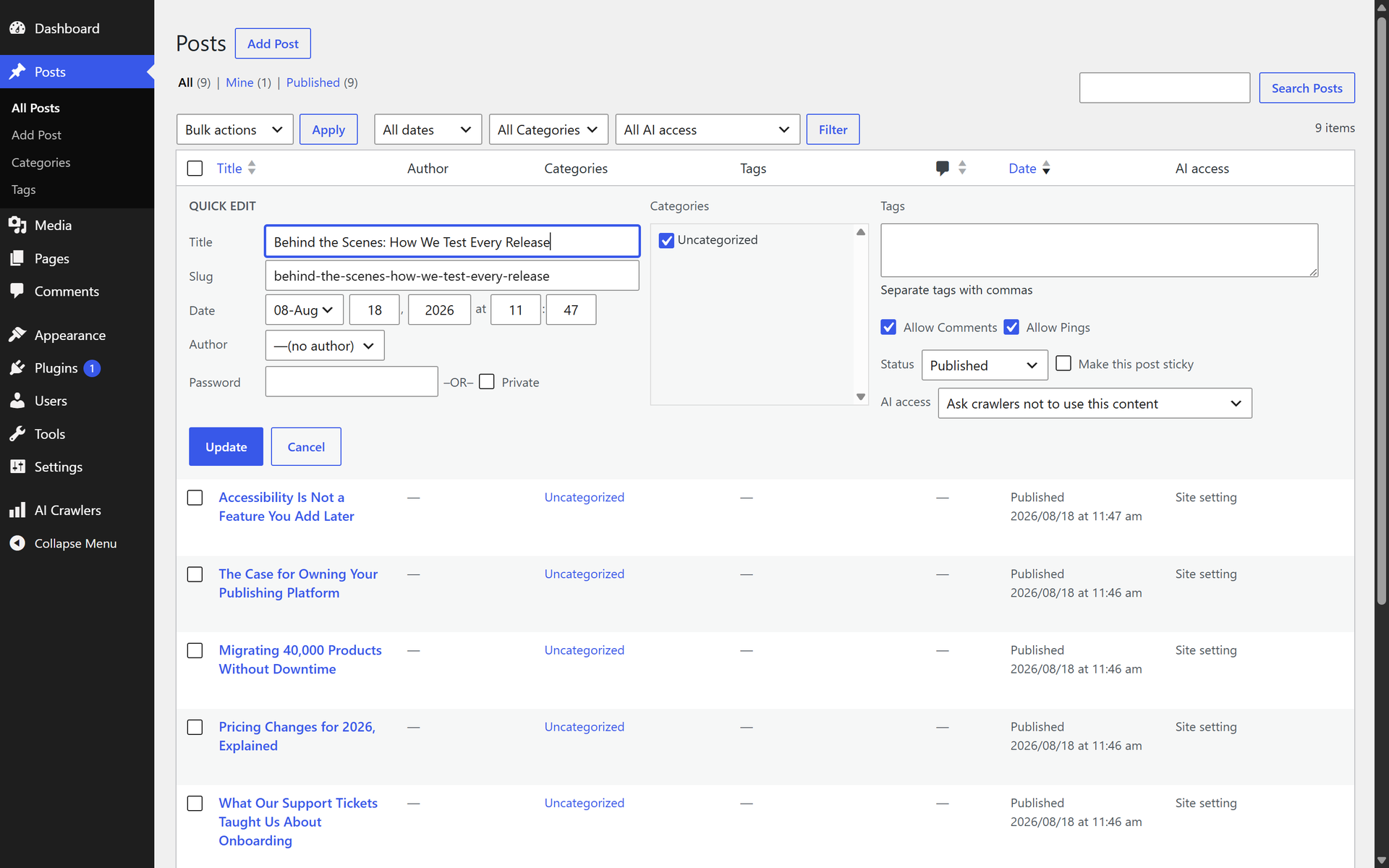
Per-content control from quick edit. A per-post setting sends the advisory header only — it adds nothing to robots.txt and cannot refuse a request.


