
Strata Site Audit Wordpress Plugin - Rating, Reviews, Demo & Download
Plugin Description
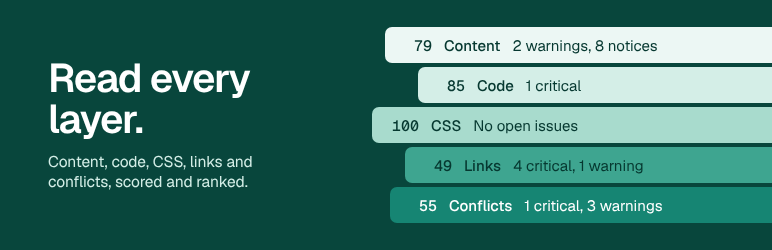
Strata tells you what is on a WordPress site, where it is used, what is broken and what is fighting with what. It is built for people who look after sites they did not build.
What it reads
- Elementor pages, templates, popups, Theme Builder conditions, global colors and fonts, and HTML widgets
- Block editor content, block types and synced patterns
- Theme and child theme files
- Customizer Additional CSS and Elementor custom CSS
- WPCode, Code Snippets, Simple Custom CSS and JS, Elementor Custom Code and Astra Custom Layouts
- Redirects from Redirection, Rank Math, Yoast SEO Premium and Safe Redirect Manager
- The media library: every image and file, and every page, setting and stylesheet that uses it
What it finds
- Broken internal links and missing images, scripts and stylesheets, with the exact page and widget that contains them. A server that is busy, slow, refuses the request or asks for a login is never reported as a broken link: Strata says it could not check, and Check again verifies any link on the spot
- Redirect chains, loops, redirects that end on a 404, and the same address redirected by two plugins
- Templates, popups, globals and synced patterns nothing uses
- Templates that point at deleted templates, and header or footer templates that target the same pages
- PHP syntax errors, deprecated WordPress functions, code that newer PHP versions break, and code worth a second look
- Shortcodes left in posts, templates and sidebar widgets after the plugin that provided them was removed, such as
[vc_row]or[et_pb_section], which visitors see as plain text - The same function defined twice, two snippets fighting over one filter, a tracking tag loaded twice, a library loaded twice, and CSS set differently in several places
- Images far larger than any screen needs, images shown without alt text, files nothing appears to use, and the same file uploaded more than once
- Page checks on every crawled page: search engines told to stay away from the whole site, a home page or other pages set to noindex, a canonical tag naming another site, missing and duplicate page titles, links and buttons with no text, form fields with no label, and pages with no language on the html tag. Reported only from what the page’s HTML shows, shown under Links, and no extra requests
What it can fix
Every finding says what is wrong and exactly what to do about it: which copy of a duplicated function, snippet, tracking tag or CSS value to keep, which ones to remove, and where each one lives. Every finding that counts places lists them in the drawer, with links to edit each one. Code, CSS and conflict findings show exactly which lines to delete (for example lines 27 to 98) with the code itself, and which copy to keep. Every fix saves what it replaces first and can be undone from the Activity screen: disable a snippet, delete a block of code stored in the database (snippets, Customizer CSS, Elementor custom CSS and code, HTML widgets), move an unused template, popup, synced pattern or media file to the trash, remove a widget or block type from every page that uses it, remove an unused global, add a redirect, collapse a redirect chain (Add redirect is not offered for an address that a query string identifies, such as /?p=123, because a redirect matches the path and would catch the whole page), replace a broken link wherever it is stored, remove a missing file or broken link from every place that references it while keeping the rest of the content, add alt text to an image and to the saved image tags that use it (the text is kept as you type it, on one line), or remove a leftover shortcode. Anything that removes something opens a question first that names it and every place it is used. Remove shortcode takes the tags out of every place that stores them, keeps the text between an opening and a closing tag, and asks first; posts keep a revision, and Undo puts back every place that was not edited since. Strata never edits theme files and never deletes anything permanently on its own: files go to the WordPress trash, after Strata shows what it can and cannot check and asks you to confirm, and come back with Undo. When you are sure, Assets > Trash empties the media trash or deletes the files you pick, after a question that names them.
Redirects in one place
Links > Redirects lists every rule from Redirection, Rank Math, Yoast SEO Premium, Safe Redirect Manager and Strata. Test all requests each rule’s address on your site a few at a time, with the crawl pause in between, and says what a visitor gets: works (with the final address), broken target, loop, chain, does not redirect, or could not check when the server was busy. Export CSV saves every rule with its target, code, plugin and whether it is on.
Built to be read quickly
The Overview shows one health score, a plain sentence about what needs attention and the five things to do next. The Issues screen lists everything in one place, filtered by area, severity or text. Assets shows the media library as a grid with a preview of each file, where it is used, and views for unused files, duplicates, oversized images and missing alt text, plus the media trash, which WordPress hides by default. The Report button in the header offers CSV, PDF report and handover report (the last two in Pro).
Scan one area at a time
The Overview lists every audit area (code, builder, shortcodes, media, links, CSS, conflicts) with when it last ran and what is open. The Activity screen lists every scan (started, paused, resumed, finished, cancelled, failed) next to the fixes, with how long each finished scan took. Scan one area to re-check it in minutes, tick several and scan them together, or run a full scan. Strata adds whatever an area depends on, so a conflicts scan reads the code first. The running scan shows how far each stage is.
Light on your server
Scans run in the background in short steps, so they work on shared and managed hosting. The link checker requests one page at a time with a pause in between; Pro checks several pages at once and paces itself to your site. Nothing loads on the front end of your site unless you create a redirect with Strata.
WP-CLI
wp strata scan --wait, `wp strata findings`, `wp strata fix <id>`, `wp strata undo <id>` and `wp strata report`.
Strata Pro
The free plugin finds the problems. Pro keeps watching, reports to clients, and works across many sites.
- Scheduled scans (daily, weekly or monthly, at the hour you choose in your site’s time zone) with email and Slack alerts when new issues appear
- An email or Slack message when a scan you started finishes or stops, so you can close the tab on a long scan
- Scan history and a “since the previous scan” view of new and resolved issues
- A log of the 404 pages real visitors hit, with suggested redirect targets
- External link checks, rate limited per host
- Likely unused CSS selectors, matched against up to 50 sampled pages
- Plugins with no use found: every active plugin that adds Elementor widgets, blocks, shortcodes, sidebar widgets or post types, reported only when none of them is used in content (including WordPress widgets placed in Elementor), sidebars, theme files or snippets and Strata could read all of them. On a multisite network, a plugin active for the whole network is not judged from one site. Cache, security, SEO, redirect, mail, backup, analytics and consent, image, page builder, commerce and multilingual plugins, Jetpack, and plugins with nothing to trace are never judged. Inactive plugins still installed are listed too. Strata never deactivates or deletes a plugin
- Merge duplicate media: every use of a duplicate file is pointed at one kept copy and the extra copies go to the trash, all in one step with one undo
- Bulk fixes with one “Undo batch” button, including moving several unused files to the trash and removing leftover shortcodes
- White-label PDF reports with your agency’s name and logo, and CSV exports named for your agency
- Handover report: a white-label PDF that maps the site for a new agency: WordPress, PHP and database versions, theme and child theme, active and inactive plugins with updates, Elementor templates and where Theme Builder shows them, where custom code lives, redirects per plugin and the media library, with a short health summary
- Import redirects from a CSV file into Strata’s own redirects: a preview checks every row first (unsafe targets, loops, rules that already exist in any redirect plugin), and the whole import is one Activity entry whose Undo removes exactly those rules
- Compare with another site: export a snapshot from one site (Report, Export snapshot) and open it on another, such as staging and live, to see the issues only one of them has, plugins and versions that differ, and settings like search engine visibility and debug mode. Both sites need the same version of Strata. Nothing changes on either site
- Resize large images to 2560 px (or your own size), one at a time or many in a background queue with progress: Strata saves a scaled copy the way WordPress does for big uploads, keeps the original file, and Undo puts every image back. Optional JPEG and WebP compression
- No limit on crawled pages unless you set one in Settings (the free plugin checks up to 500), and a faster crawl that sends up to 5 page requests at once, checks files alongside them and slows down on its own when your site struggles
Plans and pricing: stratasiteaudit.com/pricing. The free plugin’s Settings screen also links to the plans.
Bundled libraries
Strata ships with the Freemius SDK and Action Scheduler (both GPLv3 or later), nikic/php-parser (BSD 3-Clause), sabberworm/php-css-parser (MIT), htm (Apache 2.0) and the Geist and Geist Mono fonts (SIL Open Font License 1.1, loaded from the plugin folder, never from another server). The Pro edition adds dompdf, php-font-lib and php-svg-lib (LGPL) and masterminds/html5 (MIT). Each keeps its own license file.
External services
Strata contacts outside servers only in the cases below.
WordPress.org theme downloads. When you run the parent theme comparison, Strata downloads the release of your theme that matches its version from downloads.wordpress.org, to compare it with the files on your server. Only the theme’s slug and version are sent. See the WordPress.org privacy policy.
Freemius. Licensing, checkout and the optional usage opt-in are handled by Freemius. If you opt in, or activate a Pro license, details such as your site URL, WordPress and PHP versions, the plugin version and the admin name and email are sent to Freemius. Nothing is sent if you skip the opt-in. See the Freemius terms and privacy policy.
Slack (Pro). If you add a Slack webhook for alerts, Strata sends the alert text (site name, how long the scan took, how many issues are new or resolved, the titles of the newest issues, the reason a scan stopped, and a link to the results screen) to that webhook on Slack’s servers. See the Slack terms and privacy policy.
Sites you link to (Pro). External link checks send a HEAD or GET request to each external address linked from your content, to see whether it still works. Private and local addresses are never requested.
Screenshots
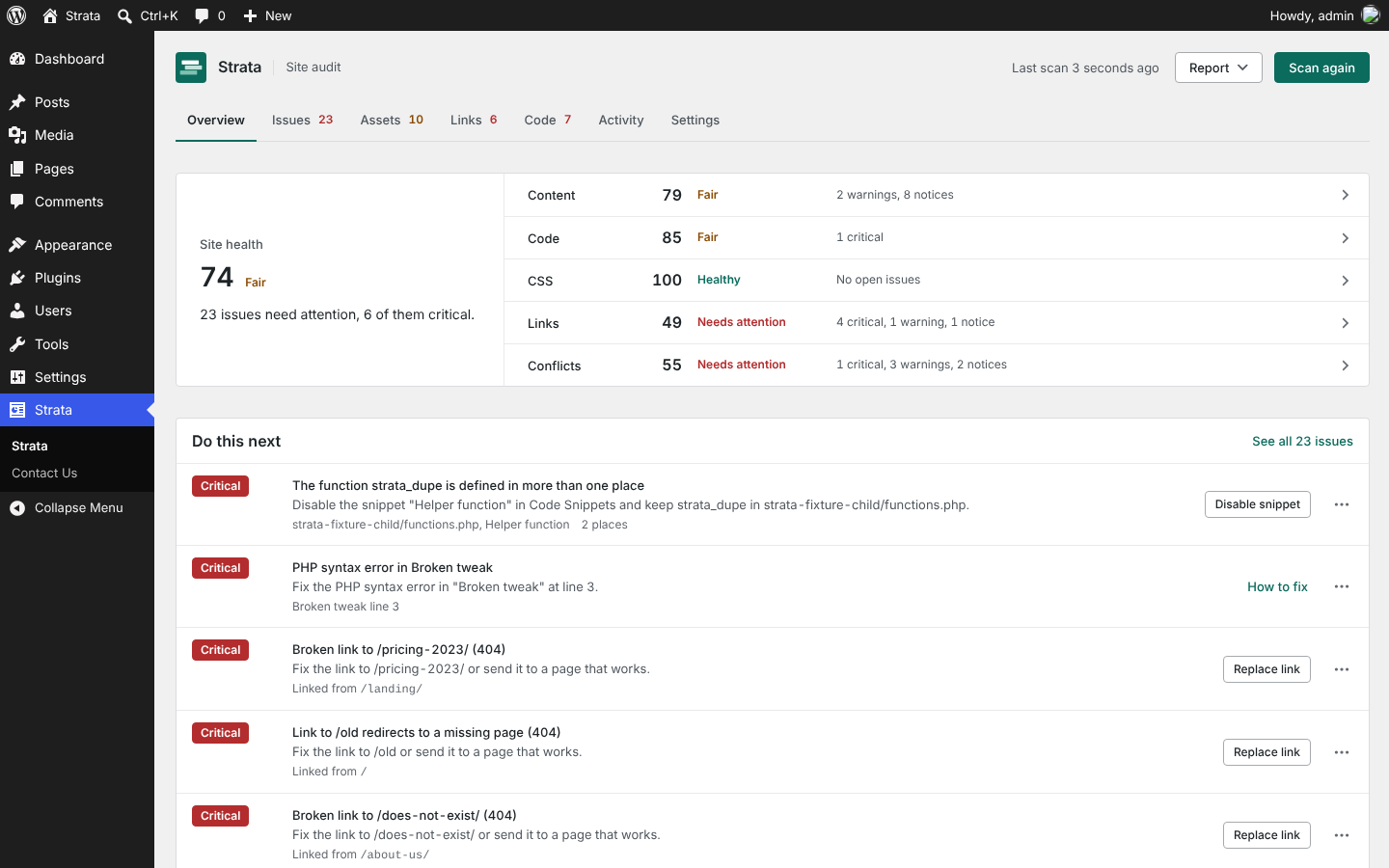
Overview: one health score, what needs attention and the five things to do next.
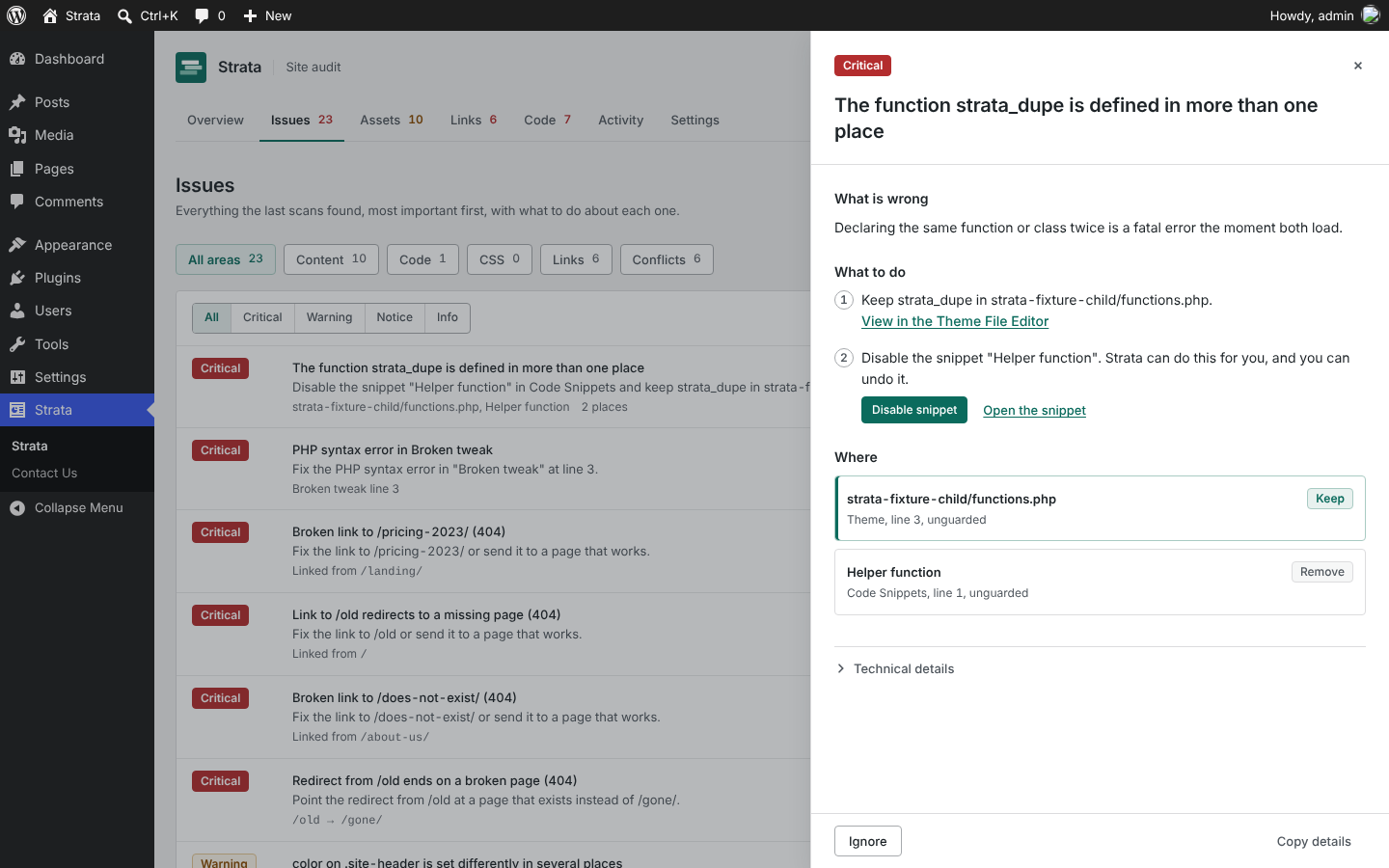
Every finding says what is wrong, exactly what to do and where it lives. Safe fixes run from the same panel, with undo.
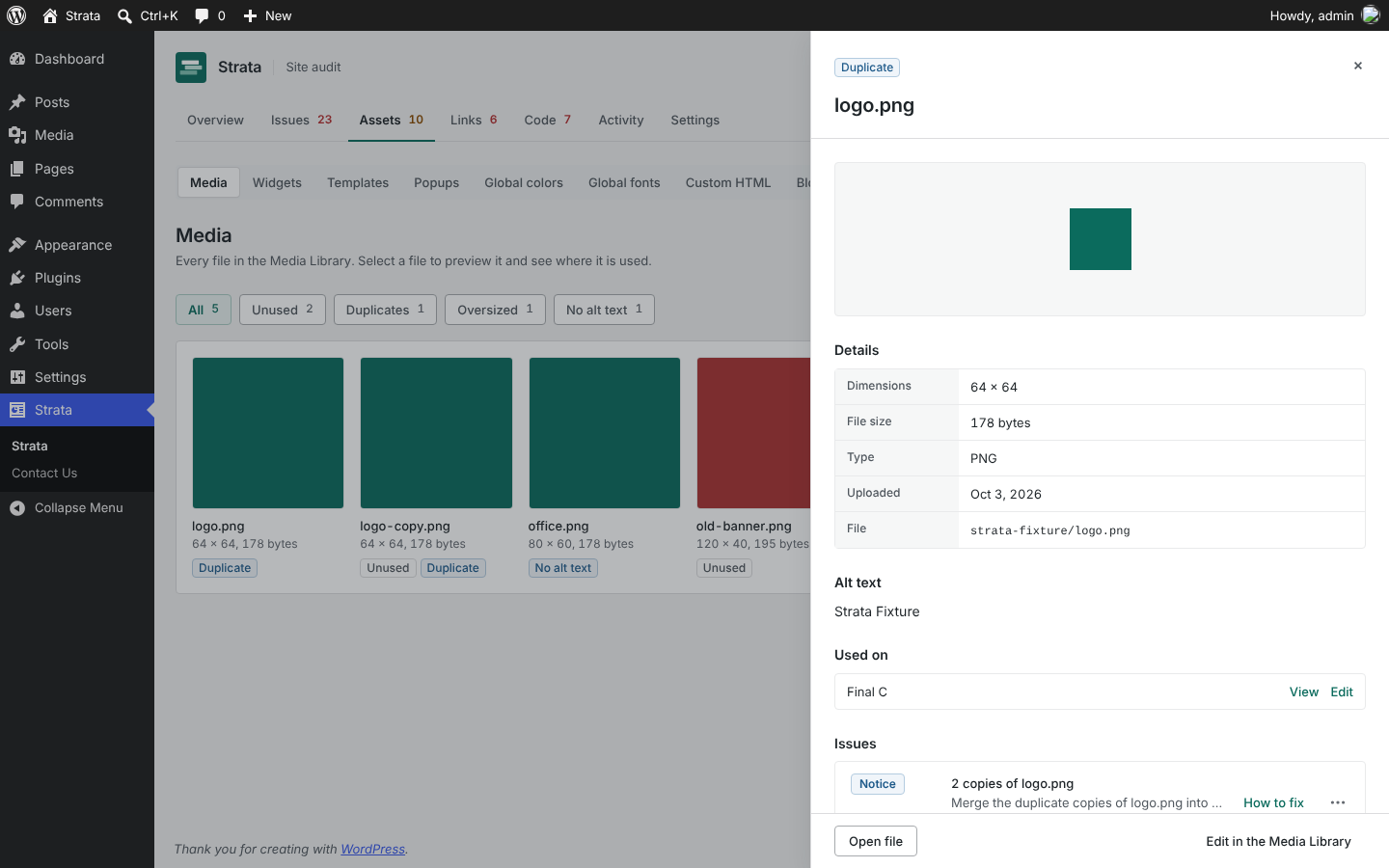
Assets: the media library as a grid with previews, where each file is used, and views for unused files and duplicates.
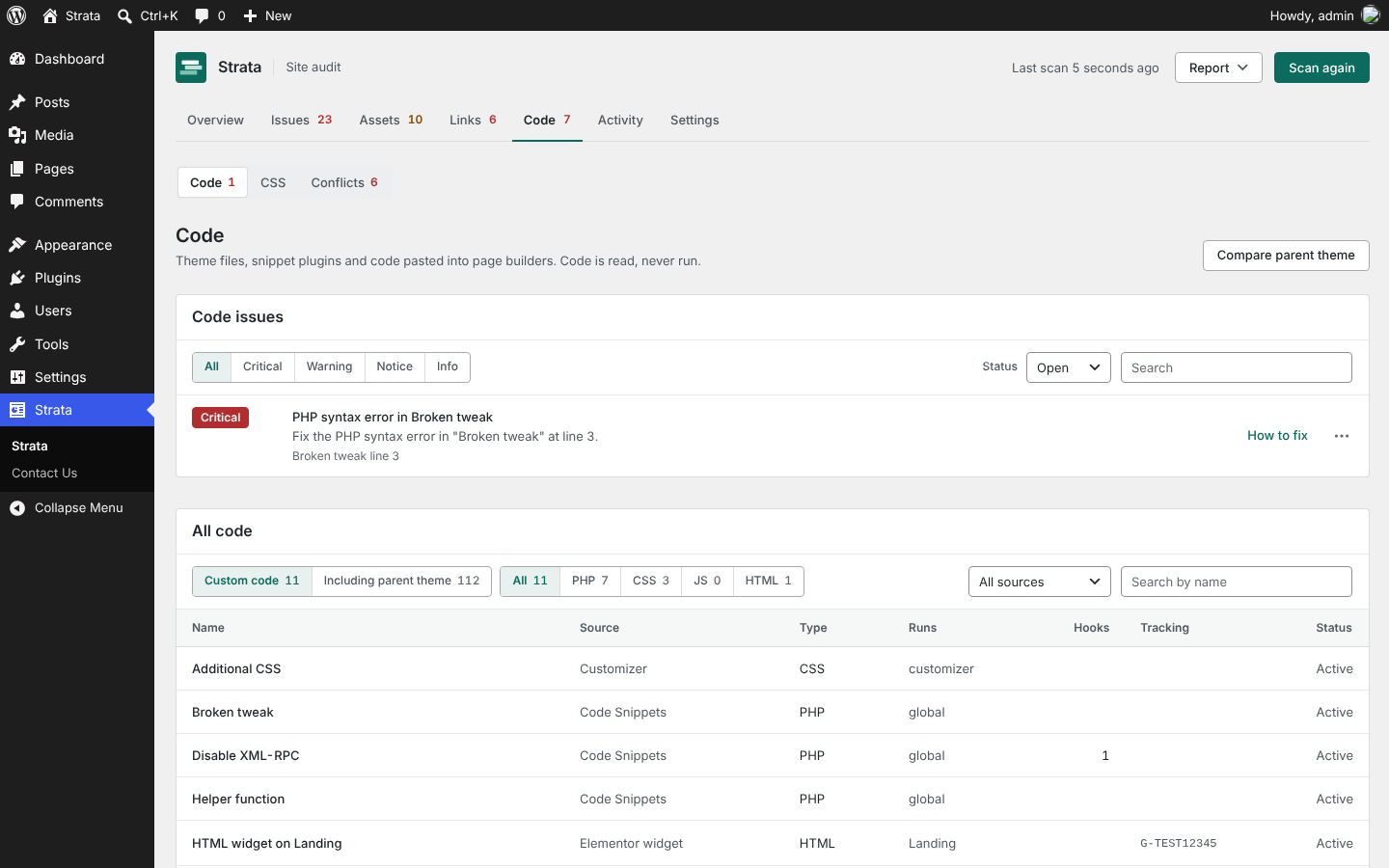
Every theme file, snippet and page builder code block, with what it hooks into and loads.
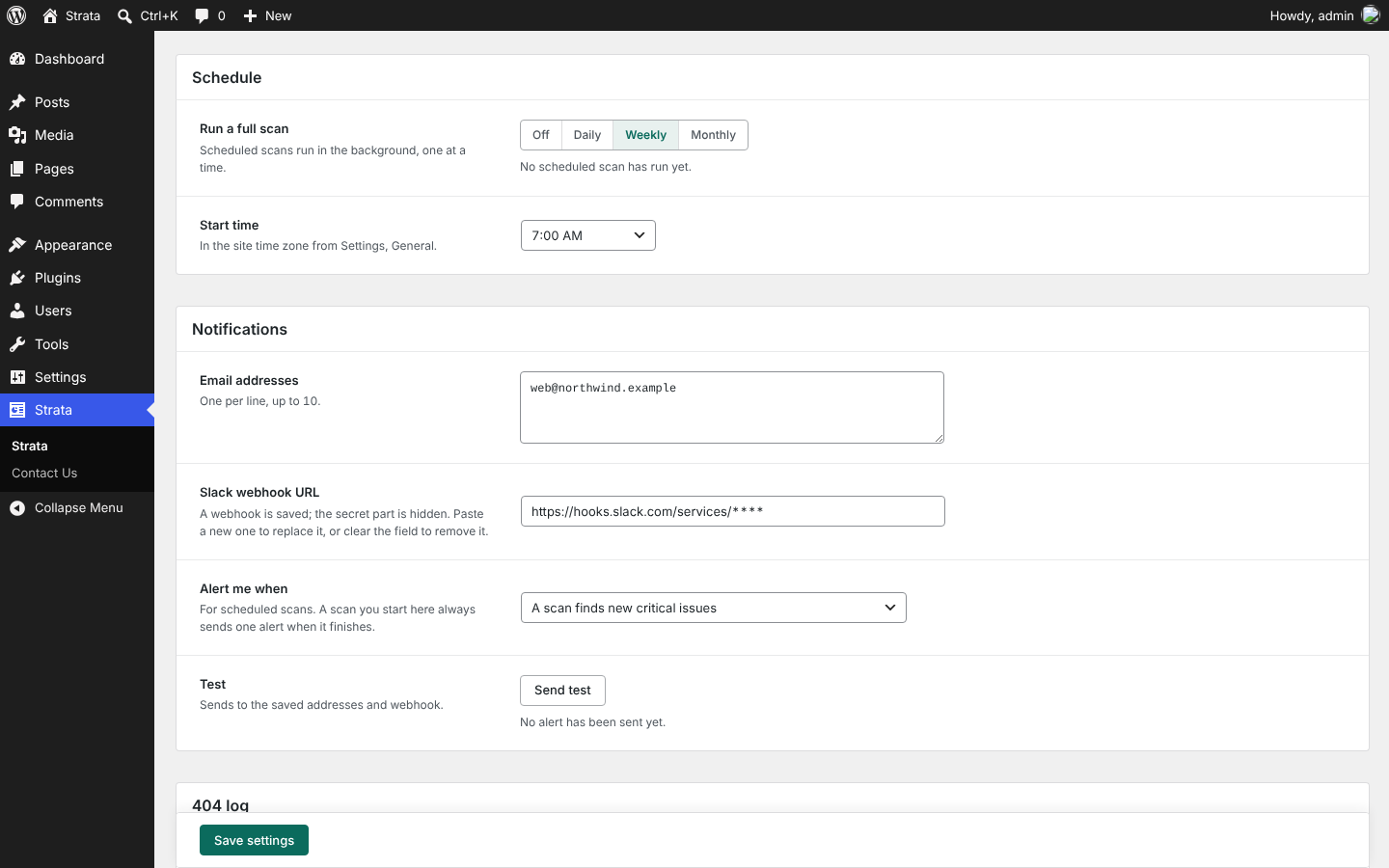
Strata Pro: scheduled scans with email and Slack alerts.


