
Tuki AI Booking Agent Wordpress Plugin - Rating, Reviews, Demo & Download
Plugin Description
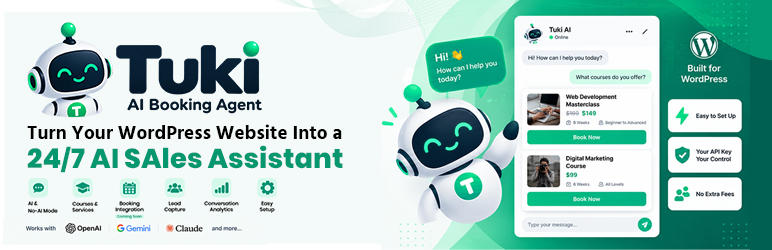
Tuki AI Booking Agent adds a chat widget to your WordPress site that answers visitor questions about your courses, services, and pricing — then hands them a Book Now button instead of leaving them stuck on a contact form.
Unlike most AI chatbot plugins, it does not require an AI subscription. A free rule-based mode answers from your own knowledge base at zero cost. If you want real AI conversations, connect your own OpenAI, Google Gemini, Anthropic (Claude), or any other OpenAI-compatible provider’s API key — there is no markup, no per-message fee, and no data passes through any server owned by us.
Built for selling, not just chatting
Most chatbot plugins are generic FAQ bots. Tuki AI Booking Agent has a real data model for what you sell — course/service title, price, discount price, duration, and a booking link — so answers come back structured, accurate, and ready to convert, with clickable showcase cards when a visitor asks to see everything you offer.
Key Features
Chat Widget
* Floating chat button with your business name, tagline, and optional custom avatar image
* Markdown-formatted replies — bold text and bullet lists render properly, not as raw asterisks
* Showcase cards for multi-item answers (e.g. “what courses do you offer?”) — title, price, duration, and a Book Now button per item
* Conversation history survives page reloads and navigating between pages
* Built-in lead capture form (name, email, phone) inside the widget
* Fully responsive, works on mobile
Design — make it fit your site
* Pick your own colors with a color picker — the chat button, header, and message bubbles all follow them
* Place the button in the bottom-right or bottom-left corner
* Set its exact distance from the bottom and side in pixels, so it never sits on top of a WhatsApp button, cookie notice, or back-to-top arrow
* Adjust its layer (z-index) if another element covers it, or it covers something of yours
Knowledge Base
* Courses — price, discount price, duration, level, modules, requirements, outcomes, instructor, seats, booking/payment links
* Services — price, features, delivery time, booking link
* FAQs with categories
* General Knowledge Base entries for policies, company info, anything else visitors ask about
* Optional: let the AI also answer from your existing published Pages, Posts, and WooCommerce Products — nothing private is ever used (see External Services below)
AI Providers — your choice, your key
* OpenAI (any model you choose)
* Google Gemini (any model you choose)
* Anthropic (Claude — any model you choose)
* Custom / Other — any OpenAI-compatible endpoint (OpenRouter, DeepSeek, Mistral, Groq, Together AI, Fireworks, Azure OpenAI, local Ollama/LM Studio, and more)
* Free “No AI” rule-based mode — answers straight from your knowledge base, zero API cost, unlimited use
* Step-by-step setup instructions and a direct “get your API key” link for every provider
* Adjustable temperature and max response length
* Custom instructions field to steer tone/language
The free mode is a real assistant, not a placeholder
With no API key connected at all, the agent still:
- Understands what you’re asking — price, discount, duration, how to book, or general details — and answers that specific thing in a proper sentence
- Handles everyday chat: greetings, thanks, goodbyes, “ok”, “are you a bot?”, “can you help me”
- Copes with typos and shortenings — “raect course”, “pyton”, “masterclas”, “nextjs” all find the right item
- Lists your full catalog for “what do you offer”, “show me everything”, or “all courses”
- Says honestly when it doesn’t know, then shows what it can help with instead of dead-ending
- Never invents a price, date, or detail that isn’t in your knowledge base
Leads & Conversations
* Every captured lead saved with the conversation that generated it
* Full conversation transcripts viewable in wp-admin, with pagination
* Configurable fallback message (e.g. “message us on WhatsApp”) shown whenever the AI has no answer or a provider error occurs — visitors never see a raw error message
Admin
* Settings organised into three tabs — General, AI Provider, and Design
* Only the settings that apply are shown: connect no AI and the AI-only options step out of the way
* Dashboard with conversation/lead counts
* No attribution shown on your site by default — an optional, off-by-default setting lets you choose to show a small “Powered by” credit in the widget footer if you want to
Works With
- Any WordPress theme
- WooCommerce (optional — for product-aware answers)
- OpenAI API
- Google Gemini API
- Anthropic (Claude) API
- Any OpenAI-compatible API (OpenRouter, DeepSeek, Mistral, Groq, Together AI, Fireworks, Azure OpenAI, local Ollama/LM Studio, etc.)
External Services
This plugin can optionally connect to third-party AI providers to generate chat replies. None of the services below is contacted unless you explicitly select it as your AI Provider and enter your own API key in Settings — the default “No AI” mode never sends any data to a third party.
Service: OpenAI (api.openai.com)
When called: every time a visitor sends a chat message, only if OpenAI is selected as the AI Provider.
What is sent: the visitor’s message, matching knowledge-base content (course/service/FAQ/page text relevant to the question), and recent conversation history.
Why: to generate the AI’s reply.
Terms of use: https://openai.com/policies/row-terms-of-use/
Privacy policy: https://openai.com/privacy/
Service: Google Gemini (generativelanguage.googleapis.com)
When called: every time a visitor sends a chat message, only if Gemini is selected as the AI Provider.
What is sent: the same as above.
Why: to generate the AI’s reply.
Terms of use: https://ai.google.dev/gemini-api/terms
Privacy policy: https://policies.google.com/privacy
Service: Anthropic (Claude) (api.anthropic.com)
When called: every time a visitor sends a chat message, only if Anthropic is selected as the AI Provider.
What is sent: the same as above.
Why: to generate the AI’s reply.
Terms of use: https://www.anthropic.com/legal/consumer-terms
Privacy policy: https://www.anthropic.com/legal/privacy
Service: Custom / Other provider (address you configure yourself)
When called: every time a visitor sends a chat message, only if you select “Custom / Other” and enter an endpoint URL as the AI Provider.
What is sent: the same as above, to whichever endpoint URL you configure.
Why: to generate the AI’s reply, using a provider not otherwise listed by name.
Terms/privacy policy: determined by whichever service you configure — since you choose the endpoint, review that provider’s own terms and privacy policy directly.
Screenshots

Chat widget open on the front end, showing a showcase card reply.

Settings — General tab, with business info and welcome message.

Settings — AI Provider tab, with step-by-step setup for each provider.

Settings — Design tab, with colors and pixel-precise widget positioning.


