Vanquish Request A Quote For WooCommerce Wordpress Plugin - Rating, Reviews, Demo & Download
Plugin Description
Vanquish Request a Quote for WooCommerce lets your customers ask for a price instead of buying straight away. They add products to a quote list, send it with a short form, and you answer with your prices. Once you accept the quote, the customer pays it online like any other order.
A quote is a WooCommerce order with its own statuses, so everything you already know keeps working: you edit prices, quantities, shipping and discounts on the order screen, the customer pays with the payment methods of your store, and the paid quote carries on as a normal order.
How it goes:
- The customer clicks Add to quote on the products they are interested in, in the shop or on the product page.
- On the quote page they review the list, fill in the form and send the request. They do not need an account.
- You get an email and find the request under Quotes in your admin. You set your prices and accept it, or reject it.
- The customer gets your quote by email, with a button to pay it. Customers with an account also find it under My account Quotes.
It works with simple and variable products, with any payment method, and with HPOS (High-Performance Order Storage).
Free features
- An Add to quote button in the shop and on the product page, with your own text, and a shortcode to place it anywhere:
[vanqt_add_to_quote id="123"]. - A quote list with thumbnails, SKUs and quantities, and a quote page with the request form, created for you when you activate the plugin. Show the form below the list or beside it.
- A link to the quote list with a counter in the menu you choose, and as a shortcode:
[vanqt_quote_link]. - Choose what can be quoted: every product, or only the products you tick on the product screen. Products without a price can be quoted too.
- Show or hide prices on the products that can be quoted, and keep or remove “Add to cart” on them: sell and quote side by side, or work on price on request only.
- A request form with name, email, phone and message, and an optional privacy checkbox linked to your privacy policy.
- Guests can ask for a quote, and pay it from the link in the email, without creating an account.
- Quote statuses of their own: New quote, Accepted, Rejected, and more, in a Quotes screen with Accept / Reject buttons, a counter of the new requests, and an Add quote button to write a quote from scratch.
- Payment of the accepted quote through the checkout of your store. Once it is paid, the quote becomes a normal order and the usual WooCommerce emails go out.
- My account Quotes for the customer: the list of their quotes and each quote in detail, with a Pay button when there is something to pay.
- Four emails, managed in WooCommerce Settings Emails like any other: New quote request to you, and Quote request received, Quote accepted (with the Pay button) and Quote rejected to the customer.
- Spam protection that needs no account anywhere: a hidden trap field and a limit on how often a visitor can send. Google reCAPTCHA v2 is there too if you want it.
- The quote list survives page caching: nothing personal is written in the page itself.
- Every text translatable; template overrides from your theme.
- Migrates automatically from the CodeCanyon plugin “WooCommerce Quote”: your settings are imported and your quotes keep working, with nothing to convert.
Premium features
- Rules for what can be quoted — by category (with or without its subcategories), by tag, by single variation, every product except the ones you list, and automatically for products that are out of stock or have no price.
- Rules for who can ask — by user role, guests included.
- Turn the cart into a quote — a button in the cart sends its whole content as a quote request, options added by other plugins included.
- Your own request form — add, remove and reorder fields: text, email, phone, text area, drop-down, multiple choice, checkbox, date, time and country. Half or full width, required or not, and copied to the order field you choose (company, billing or shipping address, customer note).
- Expiry and automation — accepted quotes expire after the time you set and can no longer be paid; a reminder email goes out before they do; requests you have not answered in time can be accepted automatically. Set a different expiry date, and write a message, on each single quote.
- The customer can reject the quote, giving a reason, and you are told by email.
- A thank-you page of your choice after the request is sent.
- Webhook — the quote is sent as JSON to an address you choose when it is created, when its status changes and when it is paid, signed so that the receiver can check where it comes from. Use it with Zapier, Make, n8n or your CRM.
- Your own sender — a “From” name and address for the quote emails only.
- Your own wording, in every language — rewrite the buttons, the headings, the notices and each email’s subject, heading and message, with placeholders such as the quote number, the total, the expiry date and the payment link, in each language of a WPML, Polylang or Falang site.
External services
This plugin can use Google reCAPTCHA v2 to protect the request form from spam. It is off by default: nothing is loaded from Google and nothing is sent to it unless you turn it on under Quotes Settings and enter your keys. When it is on, the quote page loads Google’s reCAPTCHA script, which runs in the visitor’s browser and talks to Google from there, and when a request is sent your site sends Google the response token produced by that script, together with your secret key, to verify it. The service is provided by Google: terms of service, privacy policy.
This plugin uses Freemius to manage licensing and updates for the premium version, and to offer an optional opt-in when you first activate it. Nothing is sent unless you opt in or activate a licence; if you do, Freemius receives your site URL, WordPress and PHP versions and your administrator email address, in order to deliver updates and support. See freemius.com, its terms and its privacy policy.
The premium version can send each quote to a webhook address that you enter yourself (your CRM, Zapier, Make and so on). It is empty by default and nothing is sent until you fill it in. When you do, the quote’s number, status, total and products, the customer’s name, company, email and phone, their note and the answers given in the request form are sent to that address when a quote is created, changes status or is paid. That address is your own choice, so its terms and privacy policy are those of the service you point it at.
More WooCommerce plugins by Vanquish
- Vanquish Order Approval for WooCommerce – review every order before it goes ahead, and let the customer pay before or after you approve it. Where this plugin is about agreeing on a price, Order Approval is about deciding whether an order can go ahead.
- Vanquish Upload Files for WooCommerce – let customers upload files (even large ones) on the product, cart, checkout and order pages, for custom, personalized and print-on-demand products.
- Vanquish Shipping Tracking for WooCommerce – tracking numbers on orders and emails, with 1,600+ carriers and their logos, a direct tracking link and a Track button. No account needed.
- Vanquish Multiple Addresses for WooCommerce – give customers an address book: save multiple billing and shipping addresses and pick one at checkout.
- Vanquish Attach Me for WooCommerce – attach any file to any order or product, show it to the customer and send it with the order emails.
Screenshots
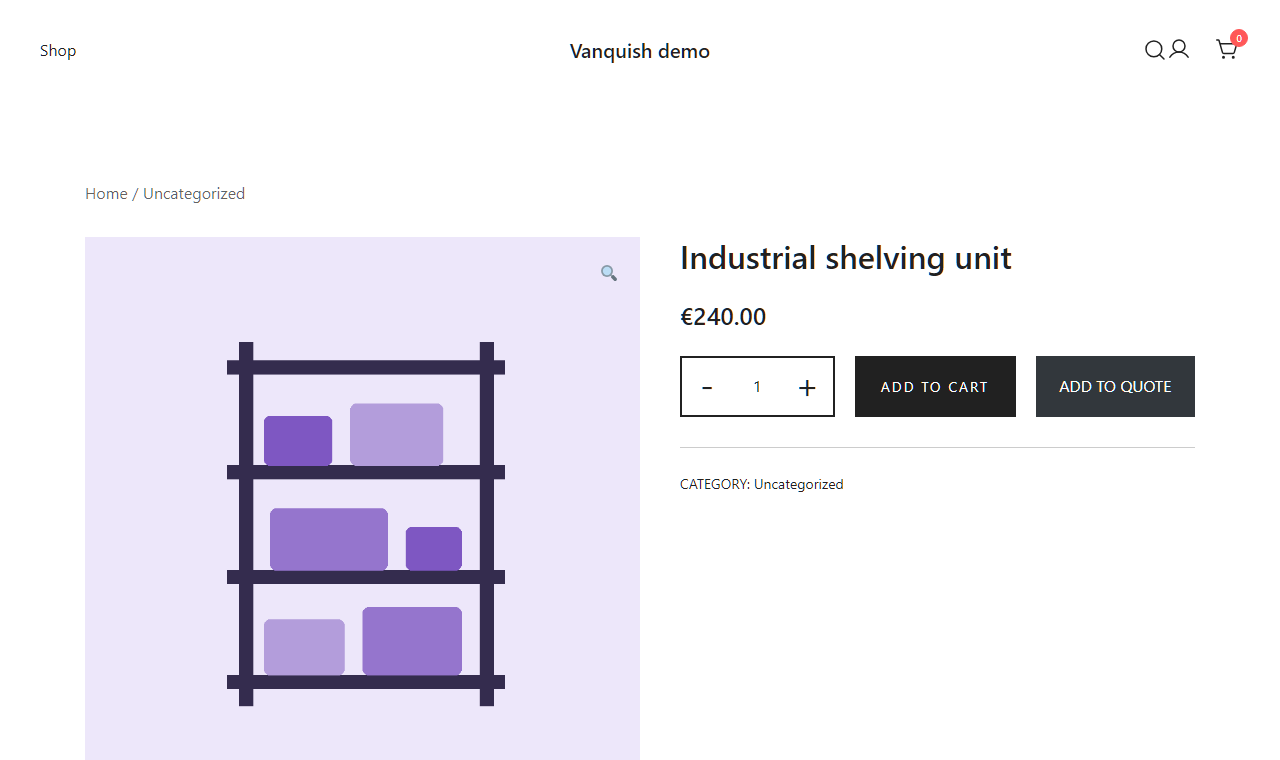
The Add to quote button on the product page, next to Add to cart.

The quote page: the list of products and the request form.

The Quotes screen in your admin, with Accept and Reject on each new request.
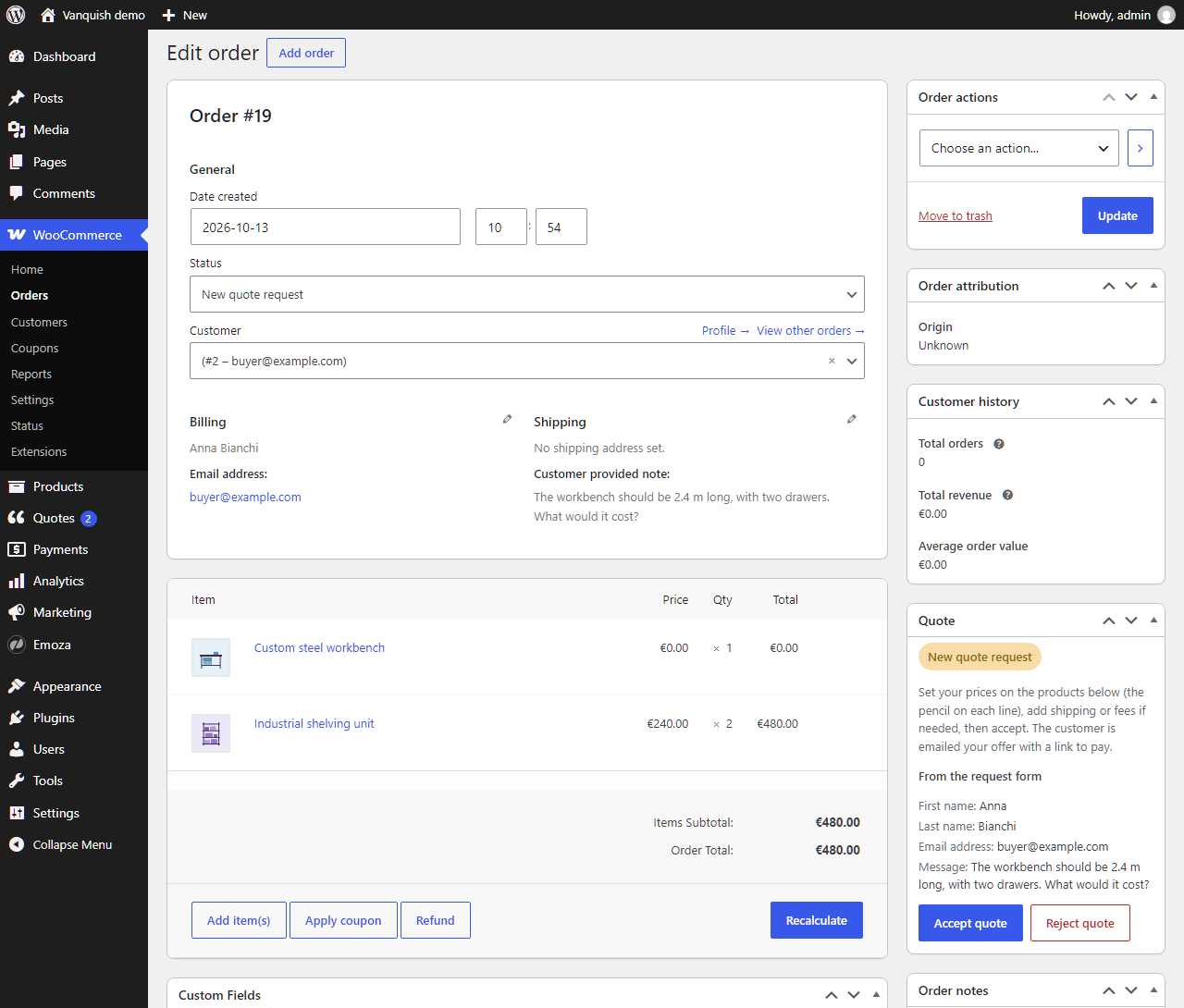
A quote on the order screen: set your prices, then accept it.

What the customer sees in My account: the quote, your prices and the Pay button.

The “Quote accepted” email, with the Pay button.

The settings: what can be quoted, prices, Add to cart, the quote page and the request form.

Premium: build your own request form, with drag and drop and a live preview.

Premium: rewrite the buttons, the notices and the emails, with the plugin’s own wording always in sight.