AverForm – Contact Form Builder, Drag & Drop WordPress Form Plugin - Rating, Reviews, Demo & Download

Plugin Description
AverForm is a fast, modern drag and drop WordPress form builder
AverForm is a lightweight contact form plugin for WordPress built around a real drag and drop form builder. Add a field, drop it where you want it, edit it in the side panel, and publish — no shortcode juggling, no page reloads, and no code.
Every form you build comes with submission storage, CSV export, email notifications, spam protection and a visual reporting dashboard out of the box, in the free plugin. Nothing is locked behind an upsell.
Whether you need a simple WordPress contact form, a feedback form, a support request form, a newsletter signup, an NPS survey or a lead generation form, AverForm gives you the fields and the workflow to ship it in minutes.
Everything AverForm Gives You
- Drag and drop form builder with a live canvas
- 30+ ready-to-use form fields
- Ready-made form templates (contact, support, newsletter, blank)
- Multi-column form layouts with adjustable column widths
- Undo / redo and full form edit history in the builder
- Desktop, tablet and mobile responsive preview
- Live form preview on a real frontend page
- Complete entry (submission) management — read, unread, favorite, trash, restore
- Bulk actions and entry search
- Export form entries to CSV
- Export and import forms as JSON, plus one-click form duplication
- Email notifications with dynamic smart codes
- Success message or redirect URL after submit
- Built-in honeypot spam protection on every form
- Reporting dashboard with charts, submission trends and per-field breakdowns
- Per-entry diagnostics — source page, browser, device and user agent
- Global defaults for label placement and validation messages
- GDPR-friendly data cleanup control on uninstall
- Fully translation ready (
.potfile included) - No jQuery, no bloat — assets load only on pages that actually show a form
Drag & Drop Contact Form Builder
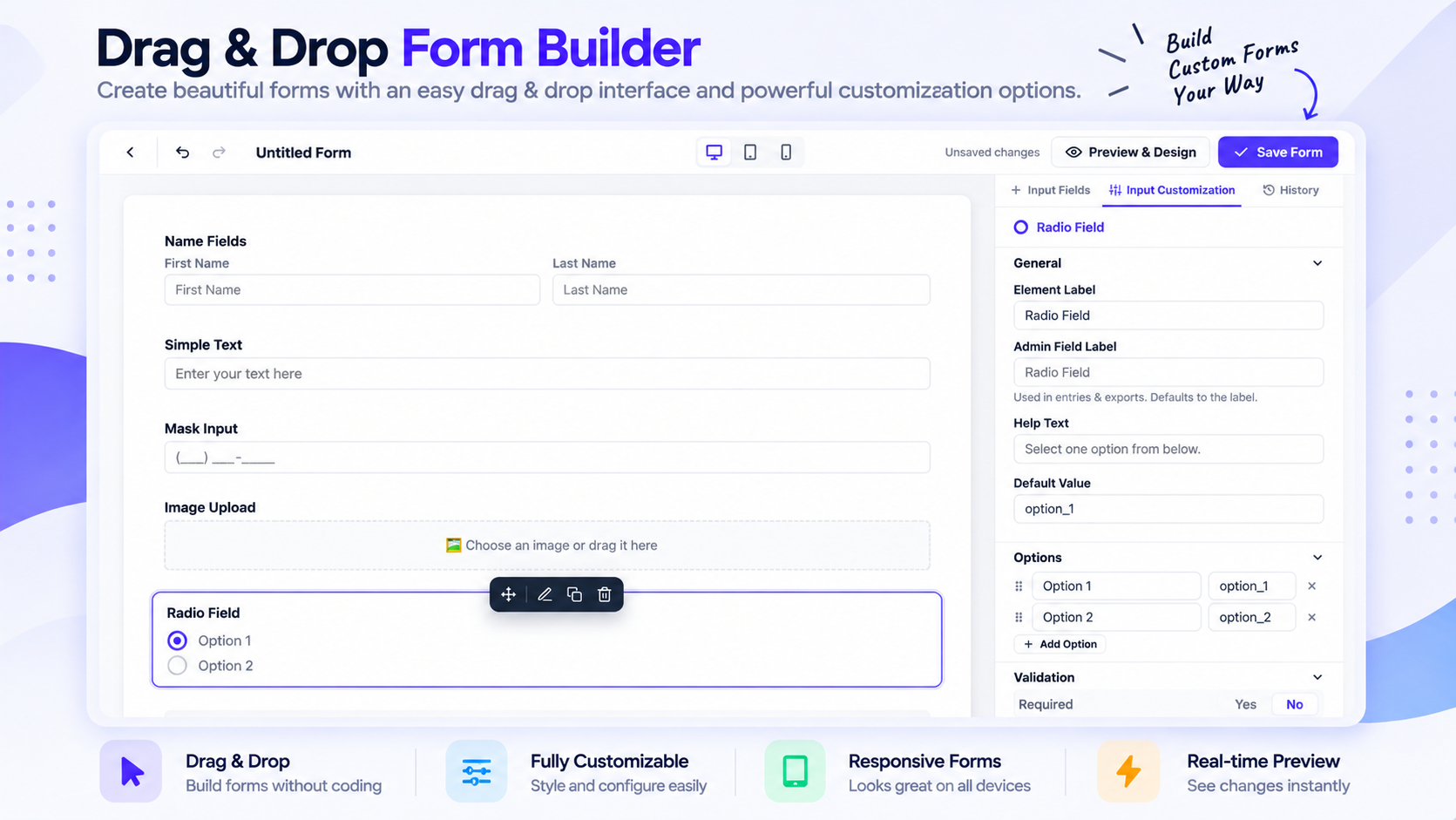
The AverForm builder is a modern React application, not a page of settings screens. Drag any field from the palette onto the canvas, reorder it by dragging, and configure it in the inspector on the right.
- Drag to add, drag to reorder, click to configure
- Multi-column containers so fields can sit side by side
- Undo and redo every change, with edit history
- Switch between desktop, tablet and mobile preview while you build
- Per-field label placement, placeholder, help text, description and custom error message
- Separate admin label for each field, used in entries and CSV exports
30+ WordPress Form Fields
General fields
- Name (first, middle, last — each toggleable)
- Simple Text
- Masked Input
- Text Area
- Number
- Website URL
- Password
- Phone / Mobile Number
- Address (street, city, state, zip, country)
- Country List (with flags, searchable, include or exclude countries)
- Dropdown / Select
- Radio
- Checkbox
- Multiple Choice (multi-select)
- Date & Time
- File Upload
- Image Upload
- Hidden Field
Advanced fields
- Rating
- NPS (Net Promoter Score)
- Range Slider
- Color Picker
- Signature
- Rich Text Editor
- Repeater Field
Layout fields
- Section Break
- Custom HTML
- Column Container (multi-column layout)
- Custom Submit Button
Consent fields
- Terms & Conditions
- GDPR Agreement
Ready-Made Form Templates
Skip the blank page. Start from a template and adjust it:
- Blank Form
- Contact Form
- Support Request
- Newsletter Signup
Every template ships pre-wired with an admin email notification, so a new form is genuinely usable the moment you publish it.
Form Entries & Submission Management
All submissions are stored in your own database — you own your data, and nothing is sent to a third-party service.
- Read / unread status with counts
- Mark entries as favorite
- Trash and restore, or delete permanently
- Bulk actions across selected entries
- Search across submission content
- Full entry detail view with every submitted value
- Submission context: source page URL, browser, operating system, device and raw user agent
- One-click CSV export of a form’s entries
Built-in Reports & Analytics
AverForm ships with a real reporting dashboard, not just a submission counter.
- Total submissions, spam, unread and created forms at a glance
- Period-over-period change indicators
- Submission trend chart over time
- Date ranges: last 7 days, last 30 days, this month, last month, last 90 days, this year
- Top-performing forms
- Per-field answer breakdowns for choice-based fields
- Submission activity heatmap
Email Notifications with Smart Codes
Send an email whenever a form is submitted, and build the content dynamically:
- Multiple notifications per form
- Dynamic recipients, subject and body
- Smart codes for
{site.name},{site.url},{admin.email},{date.now},{form.title}and{all.fields} - Insert any submitted field value into the email
- Clean, readable HTML email template
Spam Protection
Every AverForm form renders a honeypot field that traps automated bots. It is enabled by default, invisible to real visitors, needs no API keys, no configuration and no third-party service — and it never asks your visitors to solve a puzzle.
Privacy & GDPR Friendly
- Built-in GDPR Agreement and Terms & Conditions consent fields
- Submissions stay in your WordPress database — no external data processing
- Optional Remove All Data on Uninstall setting that drops every AverForm table and option when you delete the plugin
Lightweight & Fast
AverForm’s frontend is deliberately small. There is no jQuery dependency, and the form CSS and JavaScript are registered but only enqueued on pages where a form is actually rendered — so pages without a form load exactly zero AverForm assets.
Developer Friendly
- PSR-4 autoloaded, namespaced codebase following WordPress coding standards
- Clean REST API namespace (
averform/v1) for forms, entries, reports and settings - Extension points such as
averform_register_fieldsand theaverform/bootedaction to register your own field types - Custom database tables with a versioned schema
- Fully translation ready with an included
.potfile
Add a Form to Your Site
Publish a form and paste its shortcode anywhere — a post, a page, or a widget:
[averform id="1"]
The shortcode is shown next to every form in the AverForm All Forms list, ready to copy.
Screenshots

Drag and drop form builder with the field palette and field inspector
Choose a ready-made form template or start from a blank form
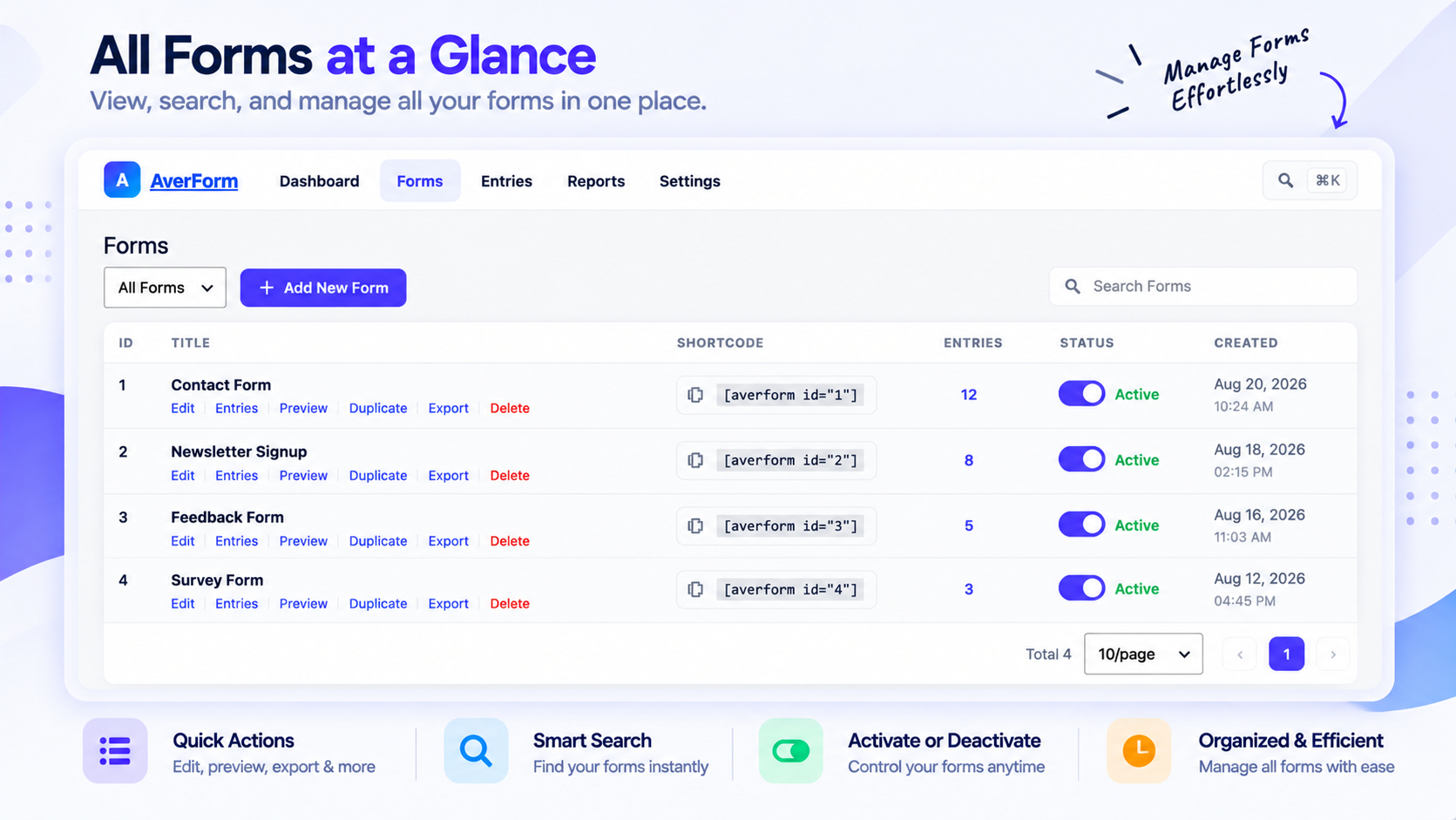
All Forms list with shortcodes, preview, duplicate and export actions

Form settings — email notifications and confirmation behaviour