RetroChat – Live Chat & AI Chatbot Wordpress Plugin - Rating, Reviews, Demo & Download

Plugin Description
RetroChat is a live chat and AI chatbot plugin for WordPress that helps you turn website visitors into customers. A no-code chatbot greets every visitor and asks the questions you choose. An AI chatbot answers from your own website and documents, day and night. And your team takes over with live chat the moment a person is needed. Every conversation lands in one shared inbox, with the full history and everything the visitor told the bot. It brings live chat software, a chatbot builder and an AI chatbot together in one place.
Use it for customer support, sales and lead generation on business websites, WooCommerce and other online stores, agency client sites and membership sites.
The plugin is free and connects your WordPress site to RetroChat, a hosted live chat service. RetroChat starts with a free 14-day trial, no credit card needed.
Why add live chat and an AI chatbot to your website?
Most visitors leave without filling in a contact form. A chat window that answers straight away keeps the conversation going: the chatbot qualifies the lead, the AI chatbot answers routine questions instantly, and your sales or support team picks up the chats that need a human. You capture more leads, reply to customers faster and stop typing the same answers every day.
No-code chatbot builder
Build a website chatbot without writing code. Each step can show a message, ask a question with quick-reply buttons, or wait for a typed answer such as a number, an email address or a phone number. IF/ELSE conditions decide what the bot asks next, so every visitor gets a relevant conversation.
- Lead qualification and lead capture without code. Ask about budget, team size or timeline, collect the visitor’s email address, and send big deals straight to sales.
- Save every answer as a variable, reuse it in later messages (“Thanks, {{name}}!”), and see it on the contact in your inbox.
- Start from a template, test the flow in the builder, then import or export flows to reuse them on other websites.
AI chatbot trained on your website (Autopilot plan)
Build the AI chatbot’s knowledge base from your website pages, PDF and Word documents, FAQs and notes. It answers visitors around the clock in their own language, which makes it a multilingual chatbot without extra setup. When it isn’t sure, it hands the chat to your team instead of guessing.
There’s no OpenAI or other AI API key to set up: the AI is built into RetroChat. The free trial includes 10 AI replies so you can try the AI chatbot on your own content.
Live chat with human handoff
Visitors can ask for a person at any time. Your team replies in real time from the RetroChat dashboard in any browser, with typing indicators and online status, and sees everything the chatbot already collected, so nobody has to repeat themselves. Set office hours: when nobody is online, the chat widget collects an email address so you can follow up.
Shared inbox for your support and sales team
- See messages as visitors type them and reply faster with saved replies.
- Assign chats, organize them with tags and snooze, and search every conversation.
- Work together with private notes and @mentions.
- Keep a contact record for every visitor, with their full chat history and CSV export.
Lead generation and proactive chat
- Show a greeting that matches the page a visitor is on, for example on your pricing or contact page.
- Catch visitors before they leave with a leave-intent prompt (desktop).
- Ask for a name and email address first with an optional pre-chat form.
- Show waiting visitors their place in the queue.
Reports
Track first response time, time to close, customer satisfaction ratings, busiest hours, top pages and per-agent performance, and see how many chats the chatbot and AI resolve on their own. A weekly email report keeps the team up to date.
Built for WordPress
- Two-minute setup. Install the plugin, paste your widget key under Settings RetroChat and click Test connection.
- Chat buttons anywhere. Add a “Chat with us” button with the
[retrochat_button]shortcode or the RetroChat button block, or point any menu item at#retrochat. - Identify logged-in users. Optionally pass the name and email of logged-in WordPress users (members, customers) so they never have to introduce themselves, with optional identity verification.
- Show the chat only where you want. Hide it for logged-in administrators and on chosen pages, by post ID or URL path, with wildcards such as
/checkout/*. - Fast. One small script, loaded asynchronously in the footer, so your pages stay quick. Works with caching plugins.
- Make the chat widget yours. Set its title, greeting, color and position in your RetroChat dashboard. Changes show up on your site straight away.
- Privacy friendly. Visitors stay anonymous until they share their details, and the plugin adds suggested text to your privacy policy guide.
Secure by default
Two-step sign-in (which you can require for the whole team), signed-in device management, new sign-in alerts, an activity log and an allowed-websites list for your widget key keep your team’s account and your visitors’ conversations safe.
Pricing
The plugin is free. RetroChat plans start at $15 per month billed yearly, and the AI chatbot is part of the Autopilot plan. Your free 14-day trial includes all Business features and 10 AI replies, no credit card needed. See pricing.
How it works
- Install and activate RetroChat – Live Chat & AI Chatbot.
- Start a free 14-day trial of RetroChat and copy your widget key from Install in your RetroChat dashboard.
- Paste the key under Settings RetroChat and click Save Changes.
The live chat appears on your site right away. Build your chatbot flow, add your content for the AI chatbot, and reply to visitors from the RetroChat dashboard in any browser.
External services
This plugin relies on RetroChat (https://theretrochat.com), a third-party live chat service, to provide the chat widget. Nothing is sent to RetroChat until you add a widget key.
- On your public pages (wherever the widget is enabled), visitors’ browsers load the chat widget from https://theretrochat.com/widget.js. The widget sends RetroChat your widget key, the address of the page and the referring page, the visitor’s browser details, the messages they write and any details they choose to share (such as their name, email address or answers to chatbot questions). If you turn on “Identify logged-in WordPress users”, the name and email address of logged-in users are sent as well. The widget stores a token in the visitor’s browser (local storage) so the conversation can continue on their next visit.
- In your WordPress admin, when you click “Test connection”, your site sends your widget key to https://theretrochat.com/api/widget/config to check it and to show your workspace name and how many agents are online.
RetroChat terms of service: https://theretrochat.com/terms
RetroChat privacy policy: https://theretrochat.com/privacy
Screenshots
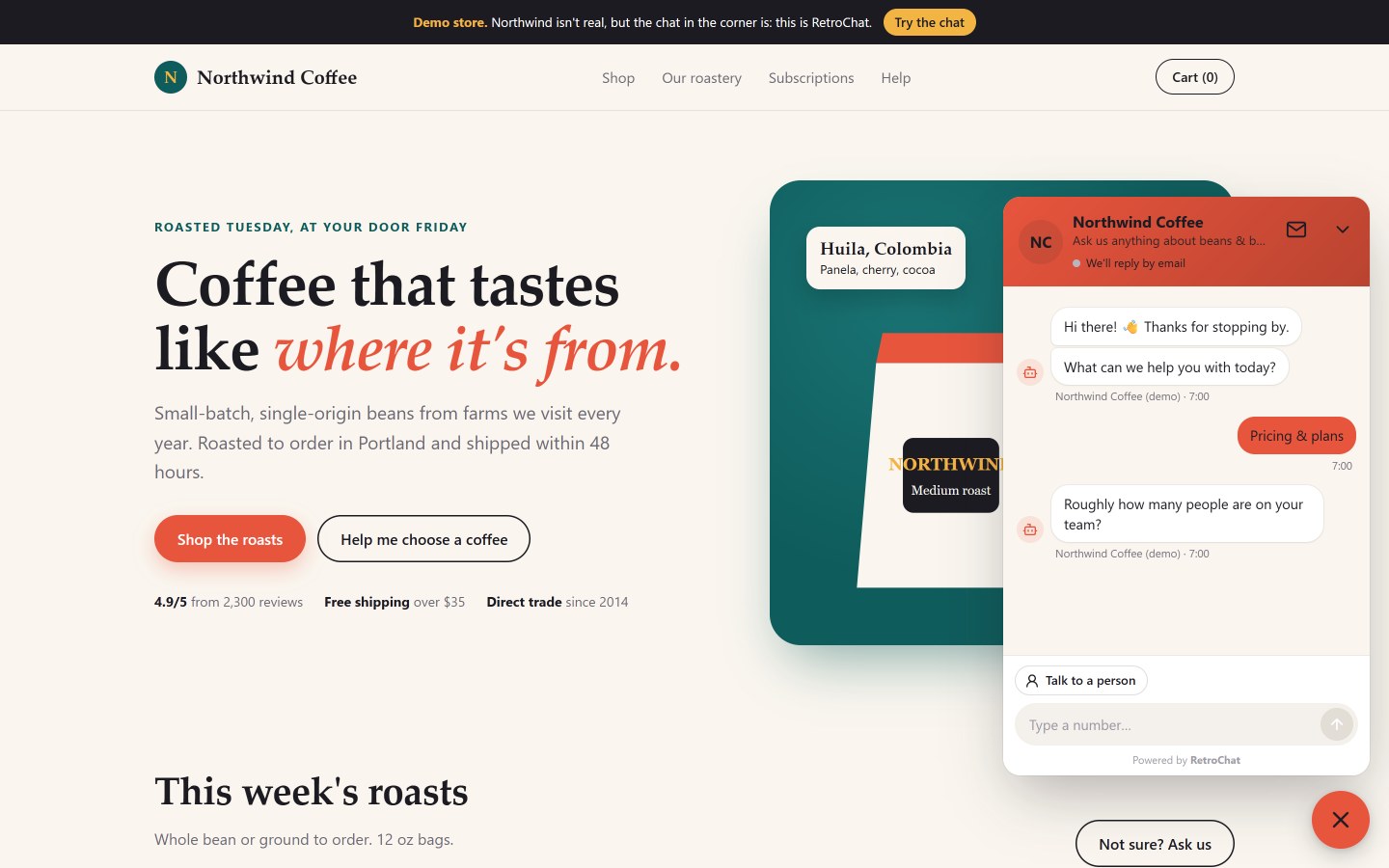
The live chat widget on a website: the no-code chatbot greets visitors and asks questions with quick-reply buttons.
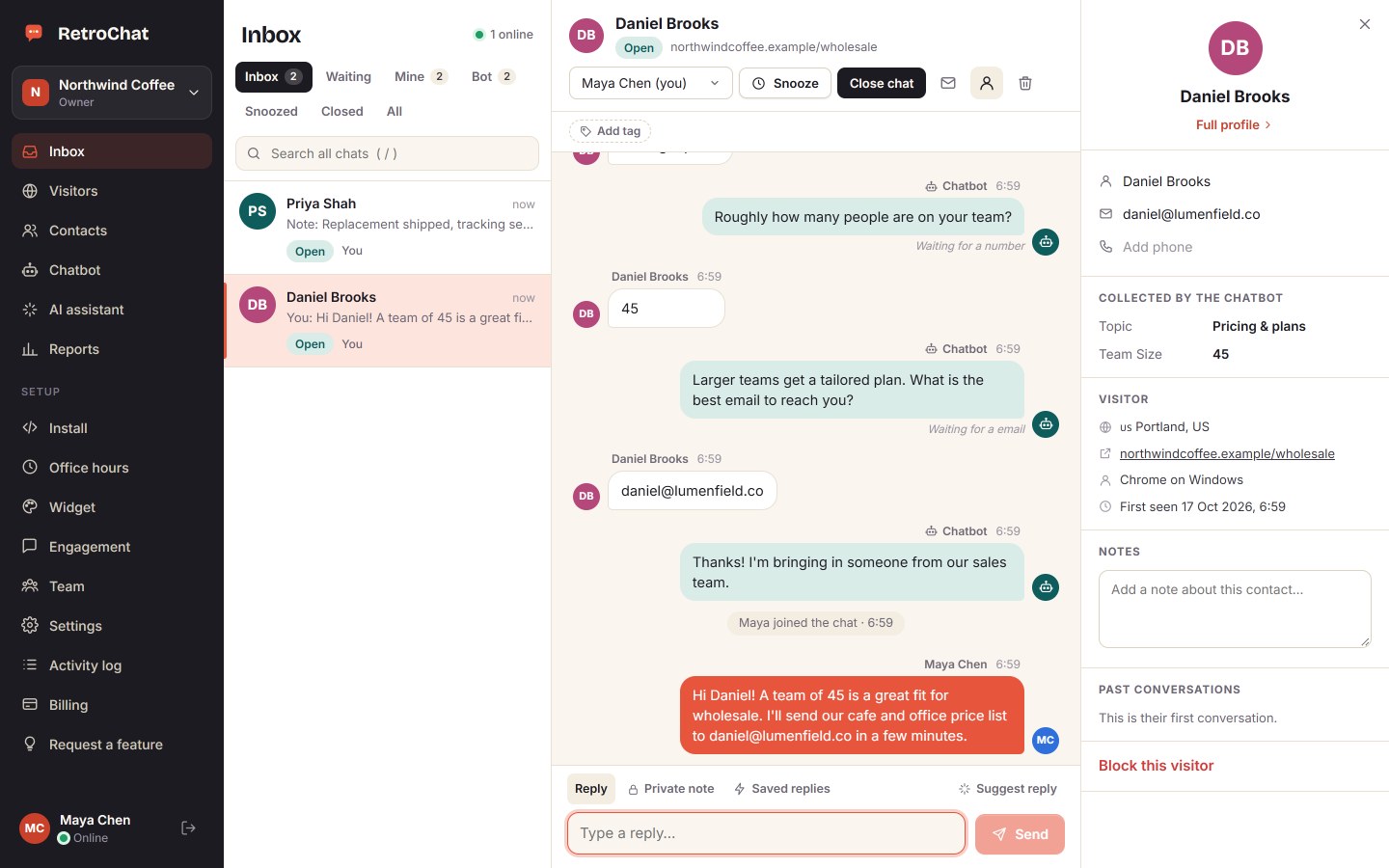
The shared inbox: the whole conversation, everything the chatbot collected and your team’s live chat replies.
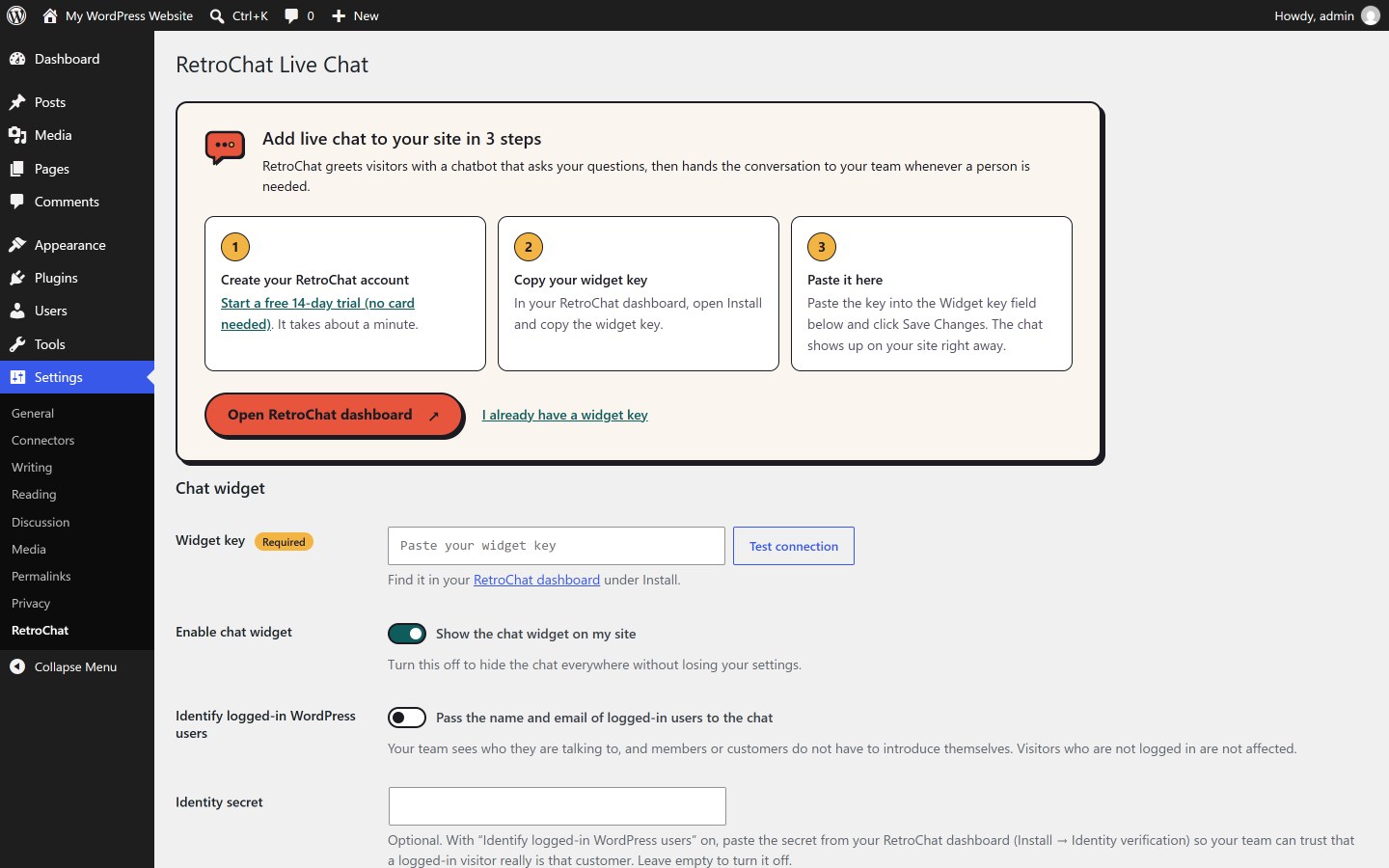
Settings → RetroChat: the three-step setup for new sites.
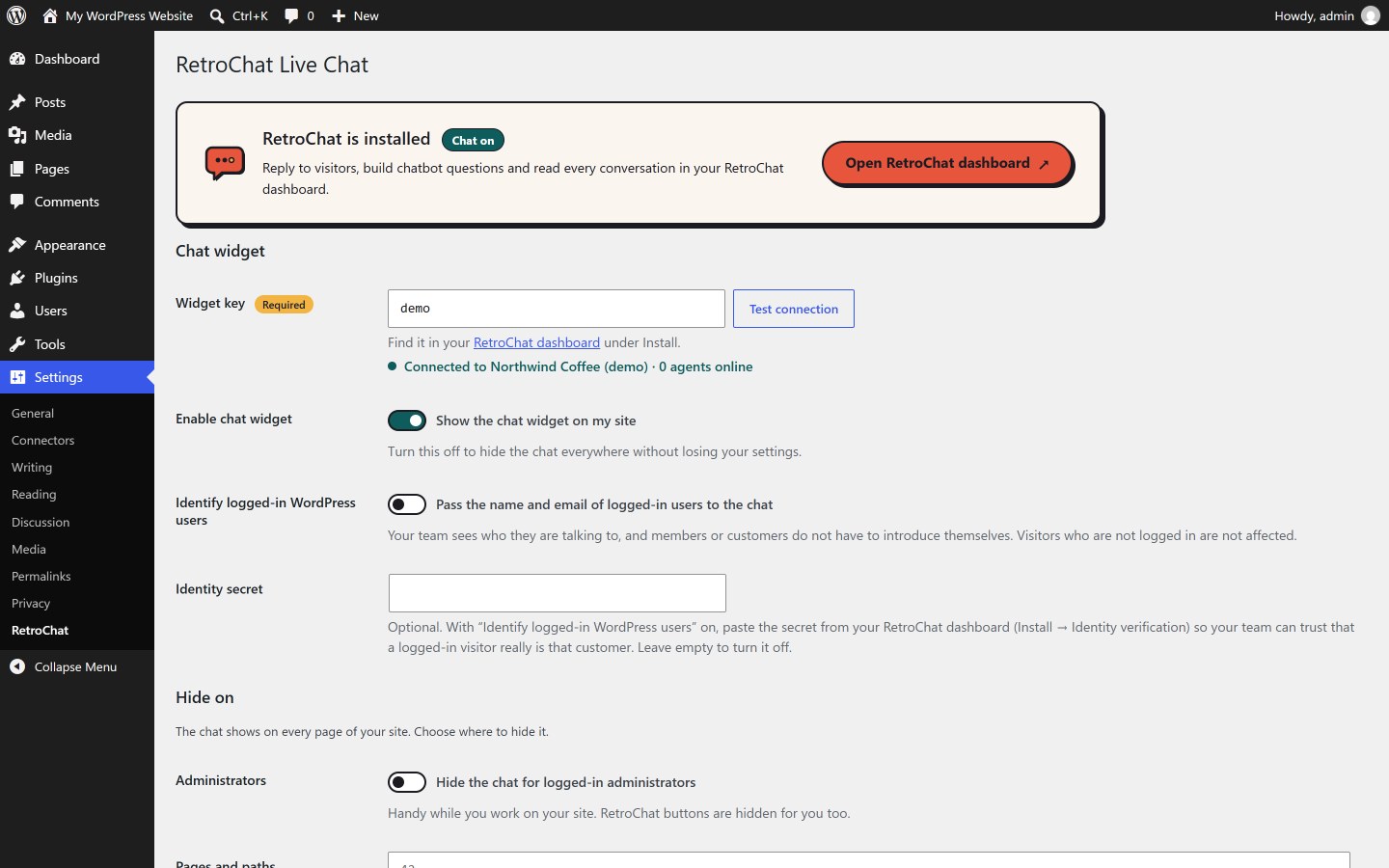
Settings → RetroChat: your widget key, Test connection and where the chat appears.
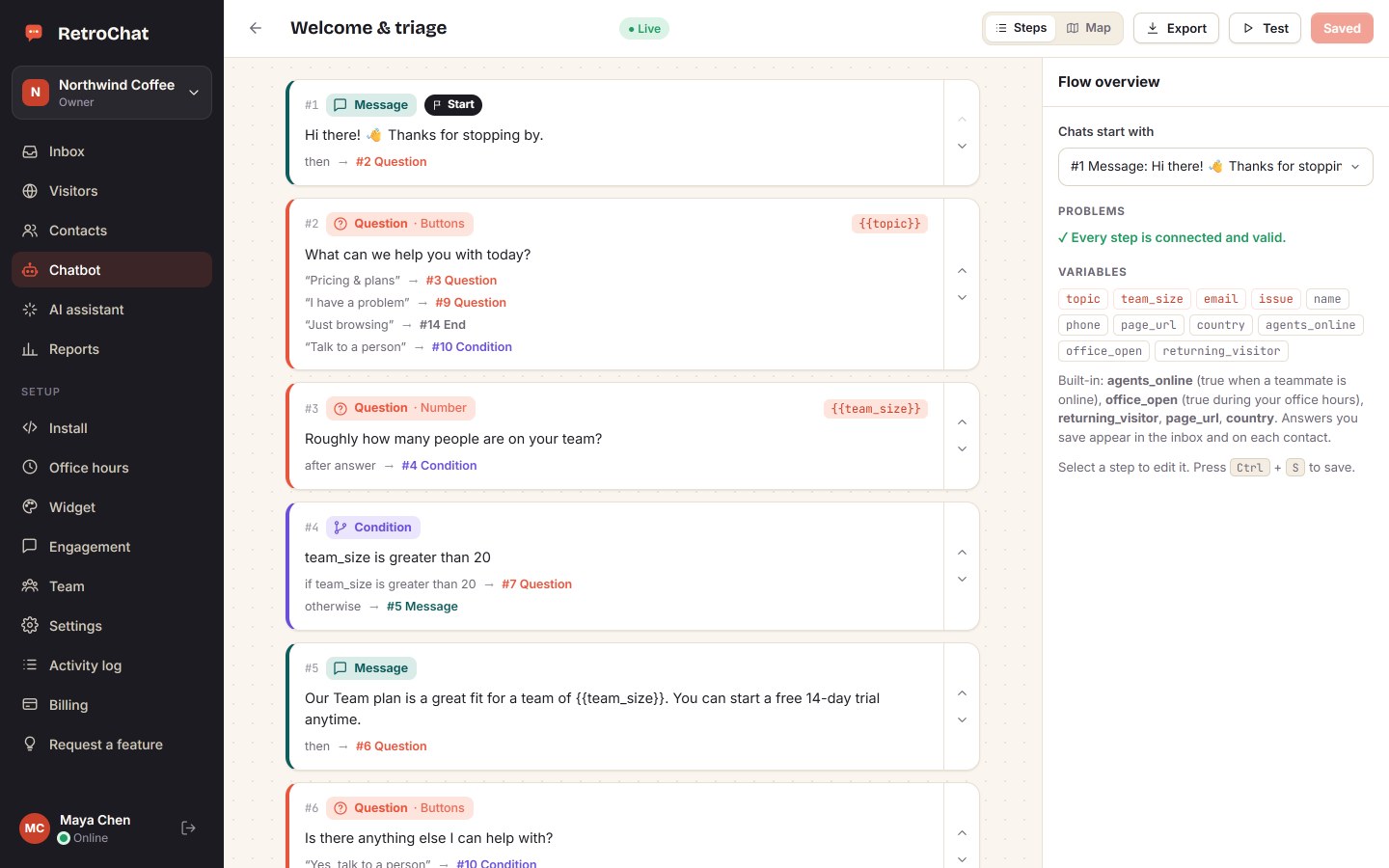
The no-code chatbot builder: questions, IF/ELSE conditions and saved answers.
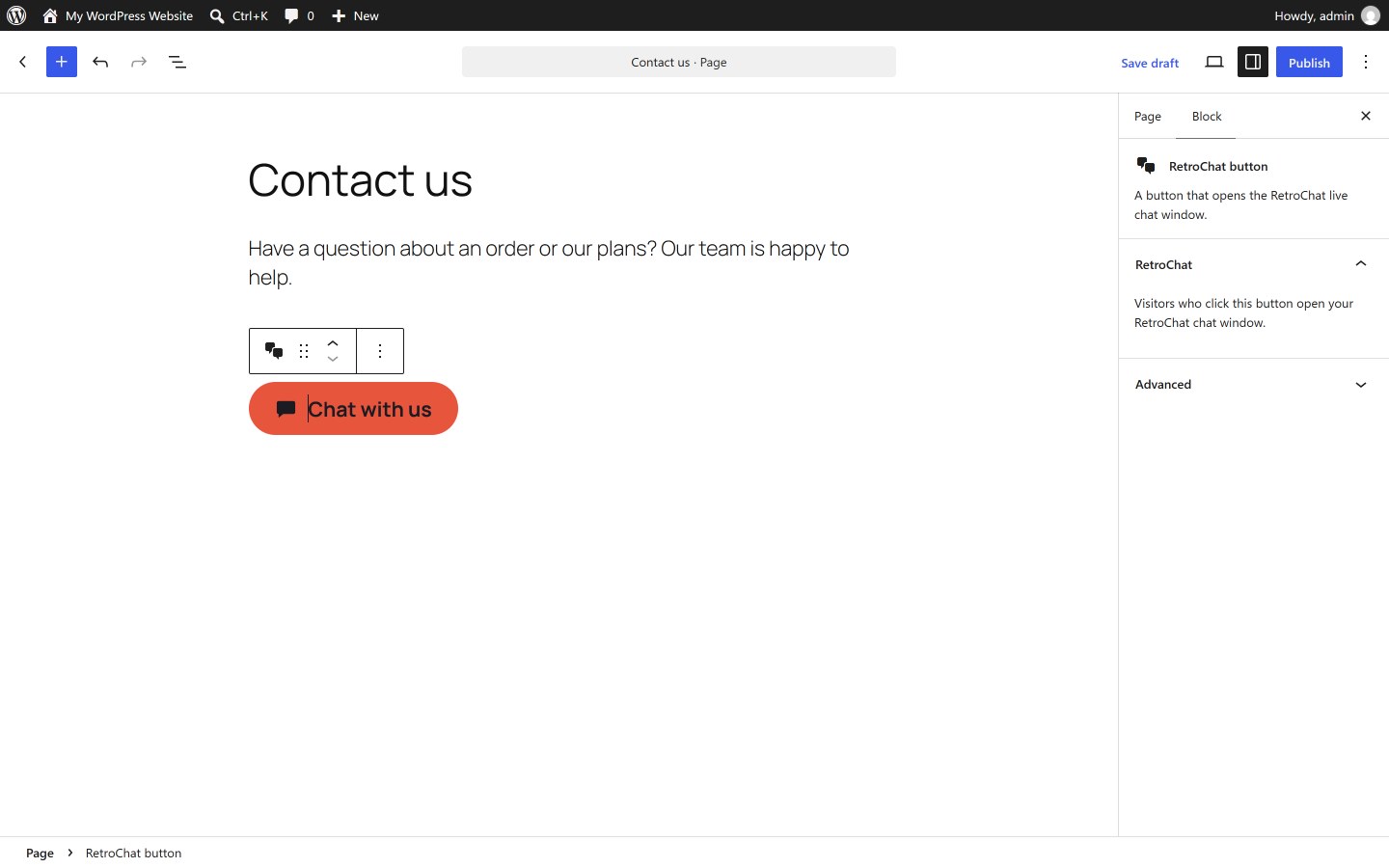
The RetroChat chat button block in the block editor.